Why Does My Jobsite Table Saw Keep Stopping?
Most jobsite table saws that keep stopping have one of three problems: not enough power reaching the motor, a blade that is dull or binding in the cut, or a safety system such as a brake or overload protector that is shutting the saw down. Work through them in that order, with the saw unplugged whenever you check anything near the blade. The same checks also explain most uneven cuts.
 EVOLUTION R10TBLXBest overall
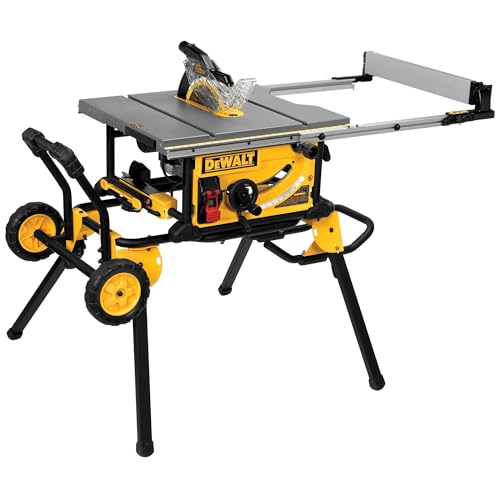 DEWALT DWE7491RSWidest rip capacity
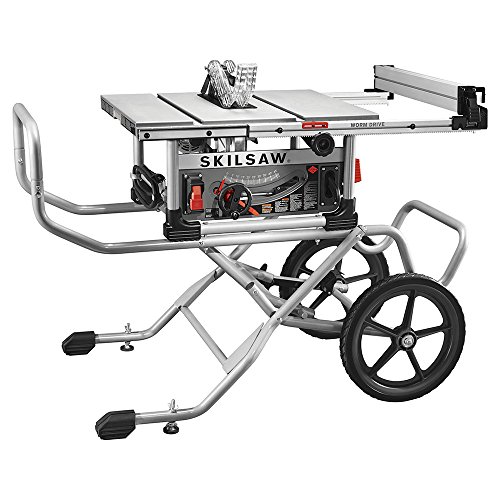 SKILSAW SPT99-11Deepest cut at 90°
Start by noticing how it stops
The way your saw stops tells you where to look. A saw that goes silent the instant you push the board points to power or a switch. A saw that slows, groans and then quits mid-cut points to the blade, the feed, or an overloaded motor.
A saw that stops with a click and then will not restart for a few minutes may have tripped its overload protector. A saw that stops with a bang and a dead blade may have fired a brake. Write down what you hear and when it happens, because that detail saves a lot of guessing.
Safety first: unplug the saw before you touch the blade, the arbor, the belt or any wiring. Wear eye protection and hearing protection whenever you run the saw to test it.
Check the power supply
Jobsite saws run on household-style power, and many list a 15 amp motor. That is a big load for a single circuit, especially if a compressor, heater or other tool shares it. A tripped breaker or GFCI outlet is the most common reason a saw shuts off.
Extension cords are the next suspect. A cord that is too thin or too long can starve the motor, which makes it stall under load and shut off. Use the shortest cord you can, and one rated for the saw's amperage.
Some saws are built to ease this problem. The Bosch GTS15-10 lists soft-start circuitry meant to reduce the chance of tripping a breaker at start-up, and the Evolution R10TBLX lists a soft start on its 15A motor. Soft start helps with the surge when you flip the switch. It does not fix a weak circuit during a heavy cut.
- Plug the saw into a different outlet on a different circuit.
- Remove the extension cord and test with the saw plugged straight in, if the outlet is close enough.
- Check the plug and cord for heat, damage or a loose fit.
- Turn off other tools on the same circuit and try again.
Look at the blade and the cut
A dull blade makes the motor work harder, heats up, and can trigger overload shutdown. Burn marks on the wood, smoke, or a need to push hard are all signs. Pitch and resin on the teeth cause the same trouble, and cleaning can restore a blade that is still sharp. If the teeth are worn, replace it. Our guide to the best table saw blades explains the tooth styles that suit different jobs.
Material matters too. Thick, dense lumber asks a lot of a jobsite motor. If you rip hardwood often, a blade made for that work cuts with less strain. See our comparison of the best table saw blade for ripping hardwood for what to look for.
Binding is the other big cause. If the fence is not parallel to the blade, or a board pinches the back of the blade as the wood relaxes, the blade drags and the motor stalls. Binding can also throw the board back at you, which is called kickback.
Never reach over a spinning blade to free a stuck board. Switch off, wait for the blade to stop completely, unplug the saw, then free the wood. Keep the riving knife and guard in place, since they exist to prevent pinching and kickback.
Brakes, belts and motor wear
Some saws add parts that can stop the blade on purpose. The Evolution R10TBLX lists an electronic blade brake, and the Bosch GTS15-10 lists a brake that stops the blade in approximately three seconds. A brake system that senses a problem may stop the saw, so check your manual for what triggers it and how to reset it. Never bypass a brake to keep working.
Other wear items can cause stops too. Because specs differ by model, use the table as a general guide and confirm details in your manual.
| Symptom | Likely cause | What to try |
|---|---|---|
| Dead instantly, no sound | Tripped breaker, GFCI or loose plug | Reset, change outlet, inspect the cord |
| Slows and groans, then quits | Dull blade, binding, overload | Clean or replace the blade, check the fence |
| Stops, restarts after a rest | Thermal overload protection | Let it cool, reduce feed pressure, check the cord |
| Squealing, then loses speed | Slipping belt, if the saw has one | Inspect the belt and tension per the manual |
| Sudden stop with a bang | Brake system activated | Follow the manual's reset steps |
| Flickering or cutting out | Worn switch or brushes | Have the saw serviced |
Why the cut comes out uneven
Uneven cuts and stopping often share a cause. A fence that is slightly out of parallel produces a cut that wanders, burns one side of the board and binds. Check the fence against the miter slot with the saw unplugged, and adjust it using the steps in your manual.
A warped or dirty blade, or debris on the arbor flange, makes the blade wobble. A wobbling blade leaves ridged, rough edges. Clean the flange surfaces and make sure the nut is snug.
The stand matters on a jobsite. A rolling stand on soft ground can rock under a wide board. Fold-out supports help, and the DeWalt DWE7491RS lists a rolling stand and a 32.5 in rip capacity, so long boards are a real consideration there. Set the legs on firm, level ground and support the outfeed side.
- Fence not parallel to the blade
- Dull, dirty or wobbling blade
- Feeding the board too fast or twisting it
- Unstable stand or uneven ground
- Wet or warped lumber
A simple routine to prevent stops
Most stopping problems are easy to prevent. A short routine before each job keeps the saw running smoothly.
- Unplug the saw and blow out sawdust from the motor vents and the base.
- Clean the blade and check the teeth for damage.
- Confirm the fence is parallel and locks firmly.
- Check that the riving knife, guard and anti-kickback pawls are installed.
- Use a short, properly rated cord on a circuit with no other heavy loads.
- Feed at a steady pace and let the blade do the cutting.
When to repair or replace
If the saw still stops after you have checked the power, blade, fence and cord, the problem may be internal. A worn switch, worn motor brushes or a failing motor needs a qualified repair, and opening a saw while it is plugged in is dangerous. Check your warranty first. The Evolution R10TBLX lists a 3-year warranty and the EliteEdge lists 2 years.
If you are shopping for a replacement, weight, rip capacity and safety features are good places to start. Our best jobsite table saw page puts those specs side by side. If you work mostly in a shop, our best table saw comparison covers larger options.
Frequently asked questions
Why does my table saw trip the breaker only when I start it?
Start-up draws a surge of current. Try a different circuit, remove other loads and use a shorter, heavier cord. Some saws list soft-start circuitry to reduce this surge, but a weak circuit can still trip.
Can a dull blade really make the saw shut off?
Yes. A dull or gummed blade makes the motor work harder and heat up, which can trigger overload protection or a stall. Cleaning or replacing the blade is a quick first fix.
Is it safe to keep using a saw that stops randomly?
No. Unexplained stops can mean a loose connection, a failing switch or a binding cut that risks kickback. Unplug the saw and find the cause before cutting again.
How long should I wait before restarting after an overload?
Follow your manual. Many saws need a cool-down period before the protector resets. Unplug the saw, find out why it overloaded, and fix that cause first.