Why Your Infrared Thermometer for HVAC Is Not Working
Most infrared thermometers that seem broken have a simple problem: weak batteries, a dirty lens, a shiny surface, or too much distance for the spot size. Work through those four checks in order, and also remember that an infrared gun reads surface temperature, not air temperature. If it still fails after that, the unit may be worn out or poorly suited to HVAC work.
 DEASOMIYE JD-04Best overall
 VEVOR IR05Fastest response
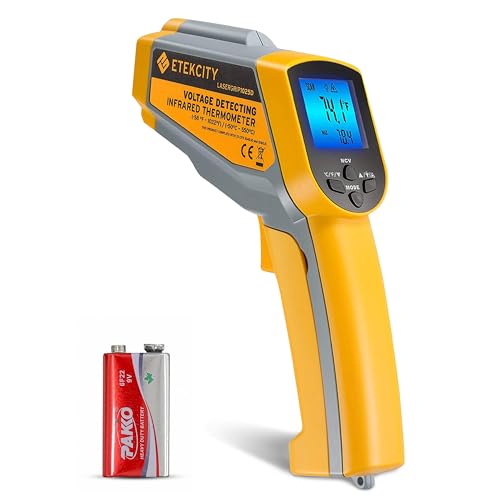 Etekcity lasergrip 1025DBest value classic
Start with power and the display
If the screen is blank, dim or flickers, check the battery first. Low batteries are the most common cause of a thermometer that will not turn on, reads erratically or drops out mid-scan. Models in our data use different cells: the Etekcity Lasergrip 1025D and DEASOMIYE JD-04 take a 9V battery, the VEVOR IR05 takes two AA batteries, and the Kizen LP300 takes two AAA.
Also check that the cells are seated the right way around and that the contacts are clean. A little corrosion or a loose spring can break the connection even with fresh batteries.
Many units shut off on their own to save power. The DEASOMIYE listing mentions a 15-second auto-off and the VEVOR listing mentions 35 seconds. If your thermometer seems to die while you work, it may just be timing out. Pull the trigger again before you assume it has failed.
Shiny metal reads too low
Emissivity describes how well a surface gives off infrared energy. Dull, dark or painted surfaces have high emissivity and read accurately. Bare galvanized duct, copper line sets and aluminum fins have low emissivity, so a thermometer fixed at a typical setting will read lower than the real temperature and may also pick up reflections from nearby warm objects.
Here is how to get around it:
Models with adjustable emissivity, such as the Klein Tools IR5 and the Etekcity 1025D (0.1 to 1.0 on its listing), let you tune the setting for the surface. If yours is fixed, the tape method works well. The steps are below.
- Put a small piece of matte black electrical tape on the metal.
- Wait a minute or two so the tape matches the metal temperature.
- Aim at the tape, not the bare surface.
- Compare a reading on the tape with a reading nearby on bare metal to see how far off the shiny surface is.
The spot is bigger than you think
The distance-to-spot ratio tells you how large an area the thermometer averages at a given distance. At 12:1, the spot is about 1 inch wide from 12 inches away and about 2 inches wide from 24 inches. At 50:1, you can stand four times as far away for the same spot size. The Etekcity 1025D and Klein IR5 are 12:1, while the DEASOMIYE JD-04 and VEVOR IR05 are 50:1.
If the spot is larger than your target, the reading blends the target with whatever is behind it. That is why a small coil connection or a thin copper line can look cooler than it really is. Move closer until the spot fits inside the target.
The laser dot can also mislead you. It marks the center of the area, but the thermometer measures a circle around it. With dual-laser models, the two dots show the edges of the measured area more closely, which helps with aiming. The Etekcity listing suggests about 14 inches (36 cm) for best accuracy on that model, so check your manual for the ideal range.
What an infrared thermometer cannot measure
Some jobs are simply outside what the tool does. Knowing the limits saves a lot of frustration.
An infrared thermometer cannot read air temperature. Pointing it at a vent opening gives you the temperature of the grille, not the air passing through it. For supply and return air checks, use a probe-style thermometer in the airstream, and use the infrared gun to scan surfaces such as ducts, motors and electrical connections.
It also cannot read through glass, clear plastic or thick dust, and it struggles with steam or fog between you and the target. A dirty or fogged lens causes similar trouble. Wipe the lens gently with a clean, dry cloth or a lens-safe wipe, and let the thermometer adjust to the room before use if you moved from a cold truck into a warm house.
Quick troubleshooting table
Use this table to match what you see to the likely cause.
| Symptom | Likely cause | What to try |
|---|---|---|
| Will not turn on | Dead or backwards batteries | Install fresh batteries and check polarity |
| Shuts off quickly | Auto-off timer or low battery | Pull the trigger again, then replace batteries |
| Readings too low on metal | Low emissivity surface | Adjust emissivity or use matte tape |
| Readings drift or seem random | Spot too large, or dirty lens | Move closer and clean the lens |
| Vent reading does not match the thermostat | Surface versus air temperature | Use a probe thermometer for air |
| Reading jumps after moving rooms | Thermometer not acclimated | Let it sit for several minutes |
Check your reading against a known surface
If you are not sure whether the thermometer or the technique is at fault, test it on something with a stable temperature. A matte surface in a room that has been at one temperature for hours is a good start. Take several readings from the same distance and see if they agree with each other.
If readings stay inconsistent on a matte surface at close range with fresh batteries, the thermometer may be damaged by a drop or heat. At that point, replacement is the practical choice.
When you shop for a replacement, look at the features that matter for HVAC work. Our best infrared thermometer for HVAC page puts the specs side by side: distance-to-spot ratio, adjustable emissivity, response time and a backlit screen for attics and crawl spaces. Very high top temperatures matter less for HVAC than for furnaces or kilns. If you often scan ducts and coils, the quick response times listed there, such as 0.25 s on the VEVOR IR05, help you cover more surface quickly.
Safety notes
Never point the laser at anyone's eyes, including your own and pets'. Most of these devices are Class 2 laser products, so avoid looking at the beam directly. Infrared thermometers are not for measuring body temperature, and the listings for these models say so.
Use the distance advantage around electrical equipment. An infrared reading lets you check a breaker, contactor or disconnect without touching it, but keep your body clear of live parts and do not open panels unless you are qualified and the power is off. Treat gas appliances and flue areas with care and keep your hands and face away from hot surfaces.
In attics and on ladders, set your footing before you aim. It is easy to lean toward a target and lose balance. A backlit screen and a longer-range model let you stay put and still read the surface safely.
Frequently asked questions
Why does my reading change when I move a few inches?
The spot size grows with distance, so a small move changes how much of the target and background is averaged together. Move closer and keep the distance consistent.
Can I use an infrared thermometer to check refrigerant line temperature?
Yes, as a quick surface check, but copper is shiny and reads low. Put matte tape on the line first, or use an adjustable emissivity setting.
Does the laser dot affect the reading?
No. The laser only helps you aim. The sensor measures an area around the dot, which is why spot size matters.
How do I know whether the battery or the thermometer is the problem?
Try a fresh battery from a sealed pack and check polarity. If the unit still does not power on or acts erratically, it likely needs replacing.
Why do two thermometers give different readings on the same duct?
They may have different spot ratios, emissivity settings or response times. Compare them on a matte surface at the same distance.