What Are the Downsides of Using Infrared Thermometers?
Infrared thermometers measure surface temperature only, so they can't tell you what is happening inside a pipe, a pan or a person. Shiny surfaces, the wrong distance, steam, dust and reflections can all skew the number. Most of these problems are easy to manage once you know about them.
 DEASOMIYE JD-04Best overall
 VEVOR IR05Fastest response
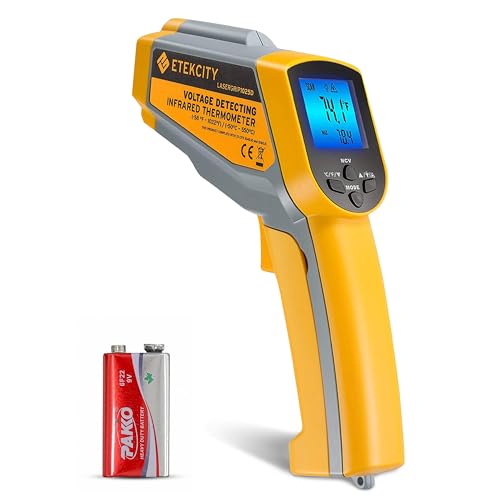 Etekcity lasergrip 1025DBest value classic
The main downsides at a glance
An infrared (IR) thermometer reads the heat a surface gives off and turns it into a temperature. That makes it fast and hands-off, but it also creates a few built-in limits.
Here are the downsides most people run into:
- It reads surfaces only, not the inside of an object or a liquid.
- Shiny or reflective materials often read lower than they really are.
- Readings depend on distance, because the device averages a circle of surface, not a single point.
- Dust, steam, smoke, frost and fog between you and the target can distort the result.
- Nearby heat sources and reflections can add error.
- It is not a medical device, and the listings we compare say not to use these units on people or animals.
- The laser pointer needs basic eye safety care.
It only measures the surface
This is the biggest limit. An IR thermometer tells you how hot the outside of something is. It does not tell you the temperature of the air inside a duct, the center of a roast or the core of a motor.
For a quick check, that is often fine. A warm supply vent or an overheated electrical connection shows up on the surface. But if you need the true internal temperature, such as for food safety, a probe thermometer that touches or enters the item is the better tool.
Surface readings can also lag behind reality. A pan that was just moved off the burner may show a surface number that does not match the food in it.
Shiny surfaces read low
Every material gives off infrared energy with a different efficiency, called emissivity. Dull, dark and matte surfaces give off energy well. Polished metal, bare copper and chrome do not, and they also reflect heat from their surroundings. The thermometer can then show a number that is too low or simply wrong.
Adjustable emissivity helps. Our infrared thermometer for HVAC comparison points out that shiny metal reads low, and that adjustable emissivity or a piece of tape on the surface gives more accurate readings on ducts and copper. Of the units in our product data, the VEVOR IR05, Etekcity Lasergrip 1025D, Kizen LP300 and Klein Tools IR5 all list adjustable emissivity, and the VEVOR, Etekcity and Klein listings describe a 0.1 to 1.0 range.
A practical workaround for any model is to stick a small piece of matte tape or dab flat paint on the spot, let it settle to the surface temperature, and measure that.
Distance and spot size matter
IR thermometers do not measure a single point. They average everything inside a circle, and that circle grows as you step back. The distance-to-spot ratio tells you how fast. At 12:1, the measured circle is about 1 inch wide from 12 inches away. At 50:1, you can be about 50 inches away for the same 1 inch circle.
If the target is smaller than the circle, the reading blends in the background and comes out wrong. That is a common downside when checking small fittings, wires or narrow pipes from too far away.
The table below shows how the ratio and a few related specs vary across some of the models in our data.
| Model | Distance-to-spot | Adjustable emissivity | Response time |
|---|---|---|---|
| DEASOMIYE JD-04 | 50:1 | Not listed | Not listed |
| VEVOR IR05 | 50:1 | Yes | 0.25 s |
| Etekcity Lasergrip 1025D | 12:1 | Yes | 0.5 s |
| Klein Tools IR5 | 12:1 | Yes | Not listed |
| Kizen LP300 | Not listed | Yes | 0.5 s |
Environment and reflections can skew results
Anything between you and the target can interfere. Steam, smoke, dust, fog and frost on a surface can all change what the sensor sees. Glass and clear plastic are another trap, because the thermometer reads the glass surface or reflections, not what is behind it.
Nearby heat sources matter too. A hot pipe next to the surface you are checking, or a sunlit wall, can push the reading off. Moving from a cold truck into a warm room can also make the device take a few minutes to settle, so give it time.
If a reading looks odd, change the angle slightly, wipe off dirt or condensation, and measure again. Taking two or three readings is a good habit.
Not for people, and safety notes
The listings in our data are clear on this point: these are industrial and surface units, not medical devices. The DEASOMIYE, VEVOR, Etekcity, Kizen and Klein listings all say they are not intended for measuring human or animal body temperature. For fevers, use a thermometer designed and labeled for that purpose.
Safety points to keep in mind:
- Never point the laser at anyone's eyes, including pets. The Etekcity listing describes a Class 2 laser, and you should treat every laser pointer with the same care.
- Stay at a safe distance from very hot items, furnaces and molten material. A longer-ratio unit lets you measure from farther away, but it does not make hot work safe on its own.
- Around electrical panels, use the thermometer to scan from outside the enclosure. Do not open live equipment unless you are qualified and following proper procedures.
- When working at heights, such as on a ladder or in an attic, secure your footing before you aim and read.
- Check the battery. A low battery can make readings unreliable, and several listings mention a low battery indicator.
How to work around the downsides
Most of the limits above are manageable with a little technique and the right model. Here is a simple routine:
- Get close enough that the target fills the measured spot.
- Use matte tape or paint on shiny metal, or set the emissivity if your model allows it.
- Keep steam, dust and glare out of the line between you and the surface.
- Take more than one reading and compare them.
- Use a contact or probe thermometer when you need an internal temperature.
Choosing a model that limits the drawbacks
If you work on ducts, coils and electrical connections, features like adjustable emissivity, a higher distance-to-spot ratio, a quick response and a backlit screen reduce many of the issues above. Our HVAC infrared thermometer comparison puts these specs side by side so you can match them to your own jobs.
Very high top temperatures matter less for HVAC than for furnaces and kilns, so you do not need to pay attention to the highest range on the sheet unless your work calls for it.
Frequently asked questions
Are infrared thermometers dangerous?
Not in normal use. They only receive infrared energy and do not send out heat. The only real hazard is the laser pointer, so keep it away from eyes.
Why does my reading change when I move closer or farther away?
The thermometer averages a circle of surface that grows with distance. At longer range, the circle may include background that is hotter or colder than your target.
Can I use one to check the temperature of water or food inside a pot?
Only the surface. For liquids and the inside of food, a probe thermometer gives a more reliable reading.
Do I need to recalibrate an infrared thermometer?
Check the manual for your model. Many units have no user calibration, so if readings seem consistently off, compare against a trusted reference and contact the maker.