How to Use an Infrared Thermometer for HVAC at Home
Point the thermometer at a clean, matte surface from within its rated distance, squeeze the trigger, and read the number while the beam is steady on the target. Compare supply and return vents, check ducts and motors for hot or cold spots, and tape over shiny metal first. You do not add a degree to the reading. If you want a correction, set emissivity or follow the offset instructions in your manual.
 DEASOMIYE JD-04Best overall
 VEVOR IR05Fastest response
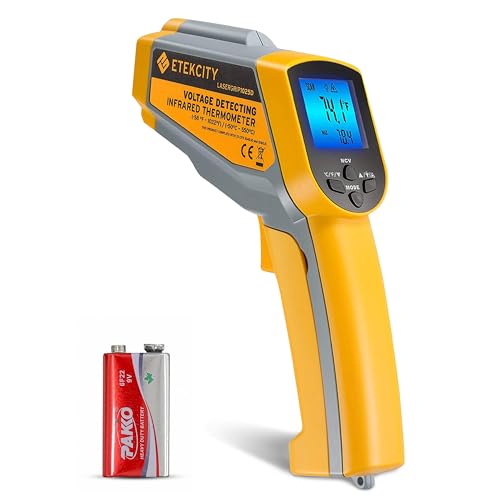 Etekcity lasergrip 1025DBest value classic
What an infrared thermometer actually measures
An infrared thermometer reads the heat energy given off by a surface and converts it to a temperature. It measures only the surface it points at, not the air behind it or the inside of a duct. That is why it works well for registers, coils, motors and wiring, and why it can mislead you on shiny or see-through materials.
The red laser is only an aiming aid. The thermometer actually reads a circle that gets wider as you move away. That circle is called the spot, and its size is set by the distance-to-spot ratio. A 12:1 ratio means that from 12 inches away you are averaging a spot about 1 inch across. A 50:1 ratio keeps a 1 inch spot out to roughly 50 inches.
If the spot is larger than your target, the reading blends in the cooler or warmer surroundings. Moving closer fixes most bad readings.
Safety and prep before you start
Most HVAC checks are safe because you never touch anything. Still, you are often working near electricity, moving parts and awkward spaces, so a few habits matter.
Never point the laser at anyone's eyes, including pets, and do not look into the beam. This is a handheld tool for objects only, not for taking a person's temperature.
- Leave electrical panels, disconnects and furnace burner compartments closed unless you are a qualified technician. The thermometer lets you check a wire or breaker from a distance, but you should not open live equipment to get a better view.
- Turn the system off at the thermostat before you remove any access panel, and keep your hands clear of fans and belts.
- Use a stable ladder in the attic or crawl space, and carry a flashlight so you can see where you are stepping.
- Wear safety glasses when you work around ducts, insulation or dusty equipment.
- Do not use the tool to diagnose gas smells. If you smell gas, leave the home and call your gas utility.
Step-by-step: taking a good reading
The same basic method works for every HVAC check. Following it consistently makes your numbers easier to compare.
- Install fresh batteries and check that the display works. A backlight helps in dim closets and attics.
- Let the thermometer sit in the room for a few minutes so it matches the surrounding air.
- Wipe dust or moisture off the spot you plan to measure.
- Stand within the distance the manufacturer recommends. Etekcity, for example, lists about 14 inches for its Lasergrip 1025D, and Kizen suggests staying near 14 inches for the LP300.
- Aim the laser at the center of the target and squeeze the trigger. The reading updates while you hold it.
- Wait for the number to settle, then note it. If your model has a hold function, release the trigger to freeze the last value.
- Write down the time, the location and the thermostat setting so you can repeat the same check later.
Common HVAC checks at home
Start with the air conditioner or heat pump running for at least 10 to 15 minutes so temperatures stabilize. Then measure a supply register and the matching return grille in the same room. The gap between them tells you how much heating or cooling the system is delivering. Your equipment manual or installer can tell you what range is normal for your system.
Because the thermometer reads surfaces, aim at the metal or painted face of a register rather than the air stream. For a more accurate air reading, a probe thermometer is better. For a quick comparison between rooms, the register surface works well.
Other useful checks include comparing several supply vents to find a weak run, scanning along a duct to find a section with missing insulation or a leak, and checking the outdoor unit's refrigerant lines. On a heating system, a duct that is far cooler than its neighbors may be disconnected or leaking.
For motors and electrical connections, look for hot spots. A blower motor or breaker that reads much warmer than similar parts nearby deserves attention from a professional. Keep your distance and leave covers on live equipment.
Getting accurate readings: emissivity, shiny metal and the degree question
Emissivity describes how well a surface gives off infrared energy. Matte, dark and painted surfaces are efficient emitters and read well. Bare shiny metal, such as galvanized duct or copper pipe, reflects heat from its surroundings, so it often reads too low.
The easy fix is to place a piece of masking or electrical tape on the metal, wait a minute for it to reach the same temperature, and measure the tape. Models with adjustable emissivity let you change the setting too. The Etekcity 1025D, Klein Tools IR5 and Kizen LP300 all list an adjustable range of 0.1 to 1.0, and the VEVOR IR05 lists the same range.
Do not measure through glass or plastic film, because the thermometer reads the window, not what is behind it. Steam, dust and condensation can also skew results.
As for adding a degree: no, you should not add or subtract one by habit. Read the number as shown. Each thermometer has a stated accuracy tolerance in its manual, and that is the margin to keep in mind. If a reading looks off, fix your technique first by moving closer, using tape and cleaning the surface.
Which specs matter for HVAC work
You do not need an extreme temperature range for home HVAC. A few hundred degrees covers ducts, coils and heating equipment. What matters more is how small a spot you can measure, how well the tool handles shiny metal, and how readable the screen is in dark spaces. Our best infrared thermometer for hvac page puts several models on one spec sheet if you want to compare them in detail.
Here is how a few models from that page differ on the points that matter most for these checks.
| Model | Distance-to-spot | Adjustable emissivity | Response time |
|---|---|---|---|
| DEASOMIYE JD-04 | 50:1 | Not listed | Not listed |
| VEVOR IR05 | 50:1 | Yes | 0.25 s |
| Etekcity Lasergrip 1025D | 12:1 | Yes | 0.5 s |
| Klein Tools IR5 | 12:1 | Yes | Not listed |
| Kizen LP300 | Not listed | Yes | 0.5 s |
Choosing and using it well over time
For close-range work, such as reaching a register or breaker from arm's length, a 12:1 ratio is workable. For ducts high on a ceiling or equipment across a crawl space, a 50:1 ratio lets you stay back and still measure a small target. If you want help choosing, the best infrared thermometer for hvac comparison lists ratio, emissivity and extras like min, max and alarm functions side by side.
Check the battery type before you buy. The Etekcity and DEASOMIYE models use a 9V battery, the VEVOR uses two AA batteries and the Kizen uses two AAA. Keep spares in your toolbox.
Store the thermometer in a case or drawer so the lens stays clean. A smudged lens can cause errors, and you can wipe it gently with a soft cloth.
Frequently asked questions
Can I use an infrared thermometer to check the air temperature in a room?
Not directly. It reads the surface it points at, so it tells you the temperature of a wall, register or duct, not the air itself. Use an air thermometer or probe for air readings.
Why do my readings change when I move back?
The measured spot grows with distance. Once the spot is wider than your target, the thermometer averages in the surroundings. Move closer or choose a model with a higher distance-to-spot ratio.
Is the laser dangerous?
It is a low-power aiming beam, but you should still avoid pointing it at eyes. Etekcity lists its Lasergrip 1025D as a Class 2 laser, and the same eye caution applies to any laser tool.
Can I use it on a person or pet?
No. These thermometers are made for objects and surfaces, and the manufacturers state they are not suitable for measuring human or animal body temperature.