Why Does My Stick Welding Machine Get Hot?
Some heat is normal, because a stick welder turns a lot of electricity into an arc and its internal parts warm up as they work. A machine that gets too hot to touch or keeps shutting off is usually running past its duty cycle, breathing through clogged vents, or fighting poor power or bad cables. Rest it, clean it and check your setup first, and leave any internal repair to a qualified technician.
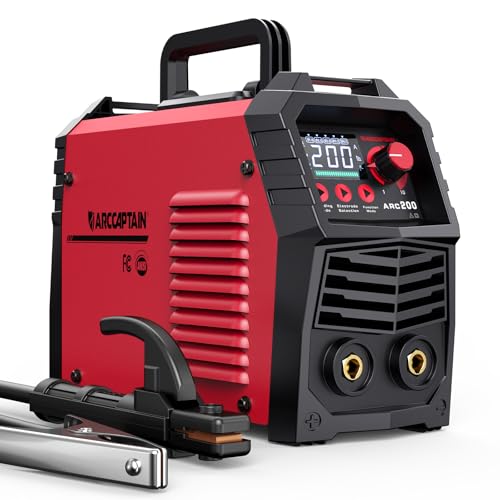 ARCCAPTAIN ARC200Best overall
 YESWELDER ARC-205DS PROBest for power
 Eioehtl portable welderHighest rated output
Warm is normal, hot is a warning
Every welder wastes some energy as heat. The transformer or inverter parts inside, the cooling fan and the output cables all warm up while you weld. A case that feels warm after a few rods is nothing to worry about.
Trouble starts when the case is too hot to hold a hand on, you smell something like burning plastic or varnish, or the machine shuts off and shows an overheat light. Those are signs that something is out of balance. Most of the time the fix is simple, and it starts with understanding duty cycle.
Duty cycle: the most common reason
Duty cycle is the share of a 10 minute period that a welder can run at a given output before it needs to cool down. A 60% rating means about 6 minutes of welding and 4 minutes of rest at the rated output. Ratings are normally given at a specific amperage, and the welder can run longer at lower settings.
Stick welding makes this easy to overshoot. Thick steel and large rods call for high amps, and long welds keep the machine loaded. On our best stick welding machine page, the highest listed duty cycle is 60%, and that is a good reference point when you check what your own machine promises.
Most modern welders have thermal protection. It cuts the output when internal temperatures climb, which protects the machine. If yours does this often, you are probably asking for more continuous output than it was built to give.
Other common causes of overheating
If you are not near your duty cycle limit, look at the conditions around the machine. These are the usual suspects:
- Blocked or dirty vents. Dust, metal grinding debris and sawdust coat the inside of a welder and trap heat.
- A fan that is slow, noisy or not spinning. Without airflow the machine heats up quickly.
- Hot, enclosed or sunny spots. A welder tucked in a corner or sitting in direct summer sun cannot shed heat well.
- Long or thin extension cords. Low voltage at the machine makes it work harder, and the cord itself can get hot.
- Loose or corroded connections. A poor ground clamp, a worn electrode holder or a loose cable lug creates resistance, and resistance makes heat right at the connection.
- Settings that are too high for the rod. Running more amps than the rod and metal need adds heat without improving the weld.
- Heavy use on a small machine. A light portable unit has less mass to absorb heat than a larger one.
What to do when it gets hot
Do not keep welding through an overheat warning. Work through these steps in order:
- Stop welding and leave the machine switched on so the fan keeps running, unless you smell burning or see smoke. In that case switch it off and unplug it.
- Move the machine into shade with open space around the vents.
- Wait until the overheat light goes out and the case feels only warm.
- Check the ground clamp, electrode holder and cable connections for looseness, discoloration or heat damage.
- Plug the machine directly into a suitable outlet, or use the shortest heavy-duty cord rated for the load.
- Lower the amperage if you are above what the rod needs, then weld in shorter bursts with rest breaks.
Basic repair and maintenance you can do safely
Welders contain high voltage and, in inverter models, parts that can hold a charge after you unplug them. Unplug the machine and let it sit before you open anything. If you are not trained to work on electronics, stop at external care and call a repair technician for anything inside.
Safe maintenance covers the outside and the airflow path. Blow dust out of the vents with dry, low-pressure air, away from your face, and wear eye protection while you do it. Wipe the case, check that the fan blades turn freely by hand with the machine unplugged, and inspect the power cord for cuts or hot spots.
Next, check the cables. Replace an electrode holder with cracked insulation, tighten loose lugs and clean the ground clamp contact surface down to bare metal. Many welders that seem to overheat are actually dealing with a bad ground.
Signs that point to an internal fault include a fan that never starts, repeated shutdowns on short low-amp welds, a burnt smell from inside, a tripped breaker or visible discoloration around the vents. These need a technician or the manufacturer's warranty service. Some models list protections such as overheating and overload cutouts in their published features, which is helpful, but those protections do not fix an underlying fault.
One more tip from a listing for the ARCCAPTAIN ARC200: it says not to power the machine on until the screen turns off and the fan stops. Cycling power quickly, on any welder, can interfere with the fan and the protection circuits, so give the machine a moment between restarts.
Safety notes before you weld again
A hot machine is also a risk to you. Keep these points in mind:
- Always unplug the welder before cleaning, inspecting cables or opening the case.
- Never weld on a wet floor or in damp conditions with worn cables.
- Keep flammable materials away from the machine and the work area.
- Wear a proper welding helmet, gloves and eye protection while you weld, and safety glasses when you blow out dust.
- Use a circuit that matches the welder's input requirements, and do not bypass a tripping breaker.
Choosing a welder that runs cooler for your jobs
If your current machine overheats on normal work, it may simply be too small for your jobs. Compare maximum amps, duty cycle and weight on the same sheet. The listed duty cycle matters most for long welds, while a lighter machine is easier to carry but has less mass to absorb heat. Here are a few models from our comparison, using their published specifications:
| Model | Max amps | Duty cycle | Weight (lb) |
|---|---|---|---|
| ARCCAPTAIN ARC200 | 200 | 60% | 7.94 |
| YESWELDER ARC-205DS PRO | 205 | 60% | 8.4 |
| Eioehtl 250A Portable | 250 | Not listed | 8.58 |
| Sefaspe ARC 200Pro | 200 | Not listed | Not listed |
Putting it together
Match the machine to the work. Use the amperage your rod actually needs, keep vents clear and let the machine rest when it asks. If you are shopping for a replacement, see the full side-by-side on our stick welding machine comparison and weigh duty cycle against the longest welds you plan to run.
Frequently asked questions
How long should I let my welder cool down?
Follow the manual. As a rule, leave it powered on with the fan running until the overheat light goes out and the case feels only warm. Resting for the remainder of the 10 minute duty cycle window is a reasonable starting point.
Can a bad ground clamp make a welder hot?
Yes. A dirty or loose ground connection adds resistance, which creates heat at the clamp and makes the machine work harder. Clean it to bare metal and make sure it grips firmly.
Is it safe to keep welding after the overheat light comes on?
No. The light means thermal protection has stepped in. Let the machine cool, find the cause and then resume at a lower setting or in shorter runs.
Can I fix an arc welder myself?
You can clean vents, replace worn cables and tighten external connections. Internal repairs involve high voltage and stored charge, so they are best left to a qualified technician.