Why Does Lighting in a Windowless Office Look Bad?
Lighting in a windowless office looks bad because a single ceiling fixture has to do the work that daylight, bounced light and several lamps usually share. The most common causes are too few lumens, a warm color tone that feels dull for desk work, low color accuracy (CRI), and light that comes from one spot and leaves shadows. Fixing the fixture specs and adding a second light source solves most of it.
 LED ENERGY PLUS LEP-2X43K4K5K405060ZEBest overall for grid ceilings
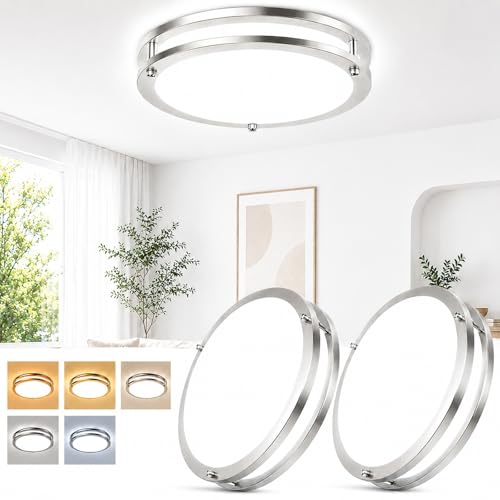 weddeg 63633008-03High CRI, top coverage rating
 LUTEC XDD-74200 lm compact fixture
What changes when there is no window
A room with a window gets light from many directions across the day. Daylight is bright, shifts in tone, and bounces off walls, floors and desks. Your eyes use that variety as a reference point, so the room feels natural even when the indoor lights are average.
Take the window away and the ceiling fixture becomes the only source. Everything you see is shaped by that one light: how bright it is, what color it is, and where it sits. Any weakness shows up right away, and there is no daylight to hide it.
That is why the same fixture that looks fine in a living room can feel flat or harsh in an interior office. The fixture did not change. The room lost its backup.
The four most common reasons it looks bad
Most complaints trace back to one or more of these problems. Check them in order, because the first two are the easiest to confirm from a spec sheet.
- Not enough light. If the fixture's lumen output is low for the room size, the space feels dim and dull, and you may squint at paper or screens.
- Wrong color tone. Warm settings around 3000 K look yellow and cozy, which is pleasant in a lounge but can feel sleepy at a desk. Settings of 5000 K to 6500 K look cooler and closer to daylight.
- Low color accuracy. CRI measures how faithfully a light shows colors compared with natural light. In a windowless room, a low CRI can make skin, paper and fabric look flat or grayish.
- Uneven or glaring light. One bright spot in the middle of the ceiling can leave dark corners, sharp shadows and reflections on screens.
How to read the specs that matter
Three numbers on a spec sheet explain most of what you see. Our best lighting for office with no windows page lists them side by side so you can compare fixtures without guessing.
Lumens tell you how much light the fixture puts out. On that page, small round flush mounts list 2400 to 4200 lm, while large ring fixtures list 8000 lm or more. The brightest listed model reaches 10400 lm. Only a few makers publish a coverage area, and the highest listed is 250 sq ft, so check that figure against your room before you buy.
CRI is the color accuracy score. The top listed CRI on our page is 90, and fewer than half the models publish a CRI at all. If a maker leaves it out, you cannot confirm how colors will look.
Color temperature range tells you whether you can reach a daylight-like tone. Look for a top end of at least 5000 K. Many fixtures here go up to 6000 K or 6500 K.
| Problem you notice | Likely cause | What to check |
|---|---|---|
| Room feels dim | Low lumens for the space | Lumen rating and any listed coverage area |
| Room feels yellow and sleepy | Warm color setting | Color temperature range reaching 5000 K or more |
| Skin and paper look flat | Low CRI | CRI of 90 where published |
| Dark corners and shadows | One fixture, uneven spread | Fixture size, number of fixtures, added lamps |
| Color is stuck on one tone | Preset set before install | Remote or in-fixture selector |
Examples from the published specs
Fixture size and output do not always go together, so a few examples help. The weddeg 13 in flush mount lists 3600 lm, CRI 90 and a 250 sq ft coverage area, and it is sold as a 2-pack. The LUTEC 13 in light packs 4200 lm into a 12.99 in fixture and also lists 250 sq ft, but the maker does not publish a CRI.
For larger rooms, the Shine LUEST ring fixtures list 8000 lm and 8640 lm, both with CRI 90 and remote control. The Brightever 12 in light lists 3200 lm, is only 0.67 in thick, and leads the page at 133.33 lm/W, but it lists no CRI.
If your office has a suspended grid ceiling, the LED Energy Plus 2x4 panels list 9360 lm at 125 lm/W and a 3000 to 6500 K range. They are built to drop into a grid ceiling, so they are not a swap for a round fixture on a junction box.
How to fix a windowless office that looks bad
You do not have to replace everything at once. Work through these steps and stop when the room feels right.
- Measure the room and note the square footage, then compare it with the fixture's lumen rating and coverage area, where one is given.
- Set the color temperature to 5000 K or higher for daytime desk work. If your fixture only sets color before install, change the setting first and then mount it. A remote model lets you adjust later.
- Choose CRI 90 where it is published when you replace a fixture, since colors will look closer to natural light.
- Add a second source. A desk lamp or wall light fills the shadows that a single ceiling light leaves behind.
- Use a dimmer if the fixture supports it. Full brightness all day can feel harsh, and dimming lets you match the task.
- Paint walls a light, matte color so the available light bounces further and glare stays low.
Pick the right fixture type for your ceiling
Round and ring-style flush mounts attach to a standard ceiling junction box. They work well in residential-style rooms and small home offices. Larger ring fixtures spread light across a wider area but hang lower, so check the height against your ceiling.
Commercial offices with a suspended grid often use lay-in 2x4 panels instead. They spread light evenly, which helps with shadows and screen glare.
Also check the controls. Some models set color with a switch inside the fixture before install. Others use a remote, which is easier to live with if you want a cooler tone in the morning and a softer one late in the day. One remote model on our page changes color from 3000 to 6500 K but lists only 2400 lm, so match the controls to your brightness needs too.
Safety notes for changing office lighting
Turn off power at the breaker, not just the wall switch, before touching a ceiling fixture. Confirm the circuit is dead with a non-contact voltage tester.
Use a stable stepladder and have a second person hold it or help with heavy fixtures. Large ring lights can be awkward to lift overhead.
Wear safety glasses when working under a ceiling, since dust and debris can fall into your eyes. If you are not comfortable with wiring, or the work involves a suspended grid and existing electrical connections, hire a licensed electrician.
Do not stare directly at bright fixtures, and use a compatible dimmer if you dim. Check that the dimmer type matches what the fixture supports.
Frequently asked questions
Can a bright light still look bad in a windowless office?
Yes. Brightness is only one factor. A bright fixture with a warm, low-CRI output can still look dull, and a single bright spot can cause glare and shadows.
Is a cool white light always better for an office with no windows?
Not always. Cooler tones around 5000 K to 6500 K suit desk work, but a softer setting can feel more relaxed later in the day. A fixture with an adjustable range gives you both.
Do I need more than one light?
Often yes. Even a good ceiling fixture leaves shadows in corners or near walls. A desk lamp or wall light fills those gaps.
What should I do if the maker does not list CRI?
Treat it as unknown. If color accuracy matters to you, choose a model that publishes CRI 90, or compare options on our best lighting page.