Why Do Scroll Saw Blades Keep Breaking? Causes and Fixes
Scroll saw blades most often break because of improper tension, pushing the wood too hard, or running a dull blade. Misaligned blade holders, the wrong blade for the job, and heat buildup also play a part. Work through those causes one at a time and most breakage stops.
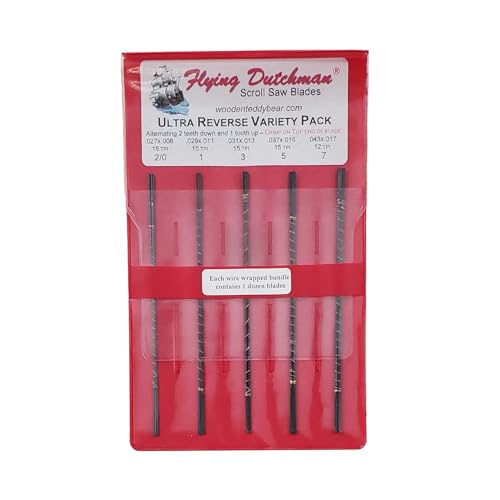 Flying Dutchman Flying Dutchman [unknown model number]Best overall
 Flying Dutchman UR-5Best single-size pack
 Flying Dutchman 191851222Clean bottom edges
Start with tension
Tension is the first thing to check. A blade that is too loose flexes and wanders, and it can fatigue and snap at the clamp or mid-cut. A blade that is too tight is under constant stress, so it can snap the moment it hits a tough spot in the wood.
A common check is to pluck the installed blade like a guitar string. You want a firm, high tone and very little sideways give when you press on it with a fingertip. Every saw is a little different, so learn what correct tension feels like on yours. Thin blades such as #2/0 and #1 are more fragile and need extra care at both ends of the range.
Also check that the blade is seated fully in the clamps and that the clamps are tight. A blade that slips even slightly will shift, bend and break soon after.
Slow down and let the blade cut
Pushing too hard is the other leading cause. Forcing wood into the blade bends it backward and sideways, which also makes the cut wander off your line. The blade should do the cutting while your hands simply guide the work.
If you have to shove to make progress, the problem is usually the blade, the speed setting, or a mismatch between blade and wood. Ease off the pressure first, then look at the other causes below.
Sharp turns are a related trap. Stopping the feed and cranking the wood around in a tight spot twists the blade. Keep the work moving slowly through the turn, or back out and cut a relief path.
Check blade condition and heat
Dull blades need more force to cut, and more force means more bending and more heat. Heat builds up friction, burns the wood and weakens the blade. If you see scorch marks or smell burning, stop and change the blade.
Blades are cheap compared with a ruined project, so swap them early rather than pushing a tired one. Many makers buy packs so a fresh blade is always at hand. A pack of 72 size #5 Ultra Reverse blades, for example, covers a lot of everyday cutting without much worry about running one too long.
Sawdust can also trap heat in the kerf, especially in thick stock. Using a blower or a dust-clearing feature on your saw helps keep the cut cool and your line visible.
Match the blade to the job
The wrong blade makes breakage more likely. Tiny blades are meant for thin wood and fine detail. Pushing a #2/0 or #1 through thick hardwood invites a snap. Our best scroll saw blades page lists sizes from #2/0 for delicate work up to #7 for heavier stock, so you can pick a size that fits your material.
Tooth style matters too. Reverse tooth blades leave cleaner undersides, while skip tooth blades clear sawdust well in plastics and acrylic. Spiral blades cut in any direction without turning the work, but they are not the best choice for crisp, straight lines.
Finally, check the end type. Pinless blades fit most modern saws, while some older and entry saws need pin end blades. A blade that does not seat properly in the holder will not stay put under load.
| Blade size | Best for | Breakage risk if misused |
|---|---|---|
| #2/0 and #1 | Fine detail in thin wood | Snap easily in thick stock or with heavy pressure |
| #3 and #5 | General work | Lower risk with steady feed and good tension |
| #7 | Thicker stock, faster cuts | Too aggressive for very tight detail |
Fix alignment and why the blade twists
If the upper and lower blade holders are not lined up, the blade is bent every stroke. That causes early fatigue breaks, and it is also a common reason a blade twists or the saw does not cut straight. Look at the blade from the front and the side. It should run straight between the clamps with no lean.
A blade that drifts to one side may also be dull, under-tensioned, or being pushed unevenly. Some drift comes from the blade itself, since teeth can cut slightly more on one side. Try a fresh blade and a lighter feed before you change anything else.
Always unplug the saw before you adjust blade holders, tension or the table. Wear eye protection, because broken blade pieces can fly, and use hearing protection and a dust mask during long sessions.
A quick troubleshooting routine
When blades keep breaking, work through the steps in order rather than changing everything at once. That way you learn which fix actually mattered.
- Unplug the saw and install a fresh blade fully seated in both clamps.
- Set tension firmly and check it with a finger pluck.
- Check that the upper and lower holders line up front to back and side to side.
- Choose a blade size and tooth style that suits the wood thickness.
- Lower the feed pressure and let the blade do the cutting.
- Watch for scorching, and replace the blade at the first sign of dullness.
- Slow the turns and avoid twisting the wood in tight corners.
Frequently asked questions
Do cheap blades break more often?
Not always, but blade quality and consistency can vary. Whatever you use, tension, feed pressure and alignment have a bigger effect on breakage than almost anything else.
Should I use a slower speed to stop breakage?
Often, yes. Lower speeds give you more control on tight curves and thin blades, and they produce less heat. Raise the speed only when the blade and wood allow it.
Where on the blade do most breaks happen?
Breaks near the clamps usually point to poor seating, bad alignment or loose clamps. Breaks mid-blade more often point to heat, dullness or pushing too hard.
Are variety packs good for finding the right blade?
Yes. A variety pack such as the Ultra Reverse set, which includes sizes #2/0, #1, #3, #5 and #7, lets you compare sizes on your own projects to see which one suits your wood.