What Is a Digital Caliper Used For?
A digital caliper is a hand tool that measures the length, thickness, diameter and depth of small objects and shows the result on an LCD screen. You use it when a ruler or tape is not precise enough, such as checking a bolt, a pipe wall or a drilled hole. Most hobby and shop models cover 0 to 6 inches (150 mm) and switch between inches and millimeters with one button.
 Kynup 170-2Best overall
 Jiavarry 20-FFour measuring modes
 LOUISWARE Silver Digital CaliperShortest auto-off timer
What a digital caliper actually is
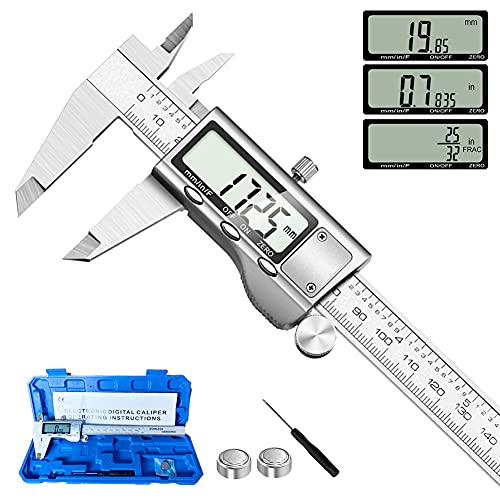
A digital caliper is a sliding measuring tool with two pairs of jaws, a depth rod and a small screen. You close the jaws on a part, and the display shows the distance between them. It does the same job as an old vernier caliper, but you read a number instead of lining up tiny scale marks.
The screen takes away most reading mistakes. A thumb roller moves the slide, and a locking screw holds the reading in place so you can pull the tool off the part and look at it. Many models also have a zero button, which lets you reset the display at any point on the scale.
What you can measure with one
A caliper handles four kinds of measurement, and each uses a different part of the tool. Several of the models on our spec sheet list this same layout: two jaw sets plus a depth probe.
The table below shows which part does which job.
| Measurement | Part of the caliper | Typical example |
|---|---|---|
| Outside size | Large lower jaws | Rod diameter, board thickness, 3D print filament |
| Inside size | Small upper jaws | Pipe bore, drilled hole, slot width |
| Depth | Depth rod at the end of the beam | Hole depth, recess depth |
| Step | Step edge on the jaw and slide | Shoulder on a shaft, ledge height |
Why use a caliper instead of a ruler
A ruler is fine for rough lengths. A caliper is better when the exact size decides whether two parts fit. The listed accuracy for the models on our page is 0.001 in, or about 0.02 mm. That is far finer than you can judge by eye on a ruler or tape.
Accuracy and resolution are not the same thing. Accuracy tells you how far a reading may stray from the true size. Resolution is only the smallest step the display shows. Some listings show 0.0005 in resolution and one lists 0.0004 in, but a finer step does not make the tool more accurate. If you want the details, our best digital caliper page lines these numbers up side by side.
Calipers also cut down on math. Switching units is one button press, and some models add a fraction mode. That helps when plans or lumber use fractions.
Common jobs and who uses them
Calipers show up in many trades and hobbies because small size differences matter in all of them. Product listings name woodworkers, machinists, jewelers, automotive mechanics, 3D printing fans and general DIY users.
Here are some everyday uses:
- Checking the diameter of a bolt, dowel or drill bit before you pick a mating part
- Measuring the wall thickness of tubing or the inside width of a fitting
- Confirming the depth of a hole or recess before you fit a pin or insert
- Comparing two parts by zeroing on one and reading the difference on the other
- Checking 3D print dimensions and filament width
- Measuring small items such as jewelry parts or hardware during repairs
How to get a good reading
A caliper is only as reliable as the way you use it. A few habits make most of the difference.
Follow these steps each time:
- Wipe the jaws and the part clean. Dust, oil and chips can change the reading.
- Close the jaws fully and press the zero button. Re-zero before each use so the readings stay consistent.
- Open the jaws just past the part, then slide them closed gently until they touch.
- Keep the jaws square to the part. A tilted tool reads larger than the true size.
- Use light, even pressure with the thumb roller. Forcing the jaws can bend the part or the tool.
- Tighten the locking screw if you need to read the screen away from the part, then record the number.
Features worth knowing about
Once you know what the tool does, a few features help you pick one that fits your work. Our best digital caliper buying guide covers these in more depth, and the core measuring specs are very close across the models it lists.
Body material matters for durability. Stainless steel resists rust and wear better than plastic, and six of the seven models on that page list a stainless steel body. A dust and splash rating such as IP54 or higher tells you more than a vague term like splash resistant.
Extras depend on the job. A hard case protects the jaws between uses. A data port, as on the iGaging model, sends readings to a computer. Absolute origin keeps the zero after power-off. Automatic shut-off, listed at 4 or 5 minutes on the models that state it, saves battery. Fraction mode, listed on the Kynup and Jiavarry models among others, suits woodworking. For machining or metric parts, inch and mm modes are enough.
Safety notes
A caliper is a gentle tool, but a few cautions apply.
Never measure a part that is moving, spinning or running. Stop the machine first, and let hot parts cool. Jaw edges and burrs on cut metal can be sharp, so handle parts with care and consider gloves. Wear safety glasses when you clean parts with compressed air or work near cutting, grinding or drilling.
Do not use the jaws as a scribe, pry bar or clamp. That damages the measuring faces and ruins accuracy. The small button cells used in many calipers can be dangerous if swallowed, so keep spares and loose batteries away from children and pets.
Frequently asked questions
Can a digital caliper measure things larger than 6 inches?
Not on a 6 inch model. All the calipers on our comparison page list a 0 to 6 inch (150 mm) range. For longer parts you would need a longer caliper or a different tool such as a tape measure.
Do I need to zero a digital caliper every time?
Yes, it is good practice. Close the jaws, make sure they are clean and press zero before you measure. This prevents reading drift. Models with absolute origin keep their zero reference after power-off, but a quick check is still wise.
Can I use a digital caliper on soft materials like foam or rubber?
It is difficult. Even light jaw pressure can squeeze soft materials, so the reading will be smaller than the true size. Use very light pressure or choose a non-contact method for these materials.
What does the zero button do besides setting the start point?
It lets you set zero at any point on the scale. That is useful for comparing two parts. Zero on a reference part, then measure the second part and read the difference directly.