Smart Lock vs Electronic, Digital, or Key Lock: What Differs
A key lock is purely mechanical. An electronic or digital lock adds a keypad or fingerprint reader that works on its own. A smart lock adds a connection (Bluetooth, Wi-Fi or a hub) so you can manage access from an app. Whichever type you pick, check the security grade and your door's fit first.
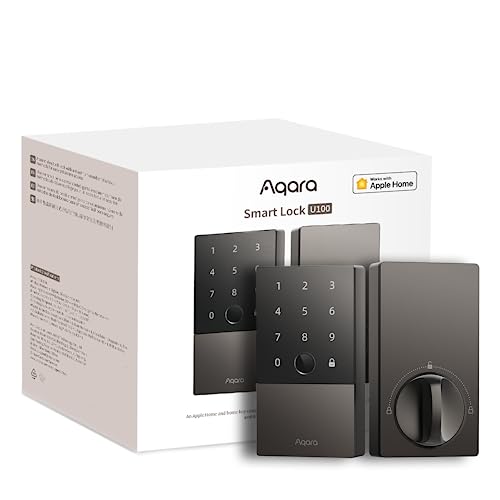 Aqara SDL-D01Best overall
 TEEHO TE001Keypad with guest codes
 Kwikset 96900-463Lifetime warranty keyed set
What each term usually means
Store listings use these words loosely, so it helps to sort them out. The names overlap, but the features behind them fall into three groups.
Most of the confusion comes from marketing. A lock called "smart" in a title may be a keypad with no app at all, and a lock called "keyed" may have no electronics. Read the feature list, not the label.
- Key lock (traditional or mechanical): a cylinder and a physical key. No batteries, no app, no codes.
- Electronic lock: a keypad, fob or fingerprint reader powered by batteries. It works on its own and does not talk to your phone.
- Digital lock: usually the same thing as an electronic lock. The word points to a keypad or screen on the door.
- Smart lock: an electronic lock that also connects to a phone app or smart home system, so you can share access, review activity and sometimes control it remotely.
- Wi-Fi lock: a smart lock with Wi-Fi built in, so it can reach your network without a separate hub.
Side-by-side comparison
This table shows what each type adds. The examples come from the products on our best smart lock page, which puts grade, fit, keys, weight and warranty on one spec sheet.
| Type | How you unlock | Needs batteries | Remote control | Example from our page |
|---|---|---|---|---|
| Key lock | Physical key | No | No | Kwikset Tylo: 2 keys, Grade 3, SmartKey re-keying |
| Keyed alike set | Physical key, one key fits every lock | No | No | Estmoon: 12 keys per set, pack of 2 |
| Electronic or digital keypad | Code, plus a key as backup | Yes | Not described in the listing | TEEHO TE001: 20 access codes, one-time PIN |
| Smart lock with hub | Fingerprint, code, app, Apple Home Key | Yes | Yes, with a hub for some features | Aqara U100: up to 50 fingerprints |
| Wi-Fi smart lock | App, code, plus a key | Yes | Yes, without a separate hub | Built-in Wi-Fi deadbolt: up to 100 access codes |
What changes in daily use
The biggest change is how you share access. With a key lock, a guest needs a key, and you have to cut or hand over copies. Keyed alike sets help with the carrying side, since one key opens every door in the set, but a lost key still means a physical rekey or swap.
A keypad lock removes the key from daily life. The TEEHO TE001 listing describes 20 access codes plus a one-time PIN that deletes itself after use. That suits a dog walker, a cleaner or a one-day guest, and you do not need an app to set it up.
A smart lock goes further. The Veise VE017 listing describes remote user management and activity logs, so you can see who came in and pause or remove someone's access. The Aqara U100 lists fingerprint entry and Apple Home Key, which lets you unlock by tapping an iPhone or Apple Watch.
Wi-Fi lock vs hub-based smart lock
Not every smart lock reaches the internet by itself. Some connect to your phone over Bluetooth for local use, and need a hub or gateway for remote control or voice assistants. The Aqara U100 listing says its remotely configurable passwords need an Aqara Zigbee 3.0 hub. The Veise listing says Alexa and Google voice control need its G1 Gateway.
A built-in Wi-Fi lock skips that extra box. The Schlage-style deadbolt on our list controls from the Schlage Home app and manages up to 100 access codes. The tradeoff is general: a lock that is always on your network depends on that network, so check how it behaves if your Wi-Fi goes down.
Before you buy, read the listing for what works with no extra hardware. That one check separates a lock you can control from the couch from one that only works when you are standing at the door.
What every type needs to get right
The "smart" part gets the attention, but the lock still has to be a good lock. Our best smart lock page puts security grade first. Look for ANSI/BHMA Grade 3 or better on any exterior door, and treat a missing grade as unconfirmed. Also check that a deadbolt is included, because a knob or lever alone does not secure a door the same way.
Then check fit. Measure your door thickness and backset. Many locks on our list fit 1.375 to 1.75 in doors and a 2.375 or 2.75 in backset, while the Aqara U100 reaches 2.165 in thickness. The TEEHO TE001 fits only 2-1/8 in bore holes, so confirm your hole size too.
Batteries matter for any electronic type. The TEEHO listing says 4 AA batteries are not included and lasts up to 365 days, while the Aqara listing includes 4 AA batteries and states up to 8 months. Those are manufacturer claims from the listings, so treat them as estimates.
Safety and backup plans
An electronic lock can run out of power, so keep a way in. The Aqara U100 lists a mechanical key and a USB-C port for emergency charging. Check that any lock you choose offers a key or similar backup, and keep a spare key somewhere outside the home with someone you trust.
Change default or simple codes, and remove codes for people who no longer need access. Do not use a birthday or house number. Wear eye protection when drilling a new bore hole, and switch off power tools before handling the latch. If you are working on a ladder or step stool, make sure it is stable before you start.
How to choose
Work through these steps in order. Most buyers land on a clear answer by step three.
- Confirm your door thickness, backset and bore hole size.
- Filter to locks that list Grade 3 or better and include a deadbolt.
- Decide whether you want keys only, a keypad, fingerprint or phone entry.
- Decide whether you need remote control, and if so, whether you accept a hub or want built-in Wi-Fi.
- Compare warranty terms and battery details, then add batteries to your order if they are not included.
Frequently asked questions
Is a digital lock the same as a smart lock?
Not always. A digital lock usually means a keypad or fingerprint reader that works alone. It becomes a smart lock when it also connects to an app or smart home system.
Can I use a smart lock without Wi-Fi?
Often yes. Many offer keypad, fingerprint or key entry with no network. Remote features and voice assistants usually need Wi-Fi or a hub, so check the listing.
Do keyed sets count as smart locks?
No. Some products found under smart lock searches are keyed sets with no electronics. They can still be a good choice for a Grade 3 deadbolt, but they add no codes or app features.
What happens if the batteries die?
Most electronic locks give a low battery warning first, such as the red light on the TEEHO TE001. Keep spare batteries on hand and use the backup key or emergency power option if the lock lists one.