Is It Worth It to Get a Smart Lock?
A smart lock is worth it if you lose keys, share your door with other people, or want to lock and unlock without carrying a key. It is less worth it if you only want a stronger lock, because security grade and a real deadbolt matter more than apps. Check the grade and your door fit first, then decide which features you will actually use.
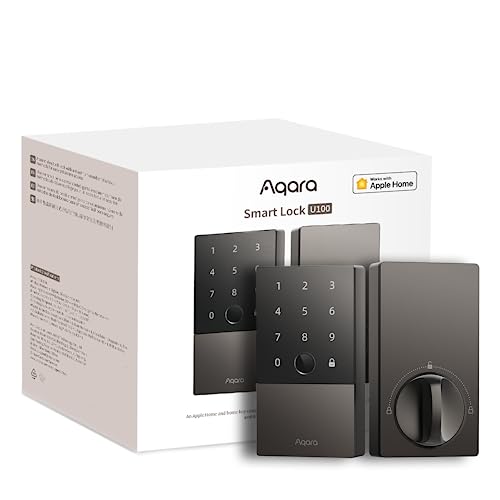 Aqara SDL-D01Best overall
 TEEHO TE001Keypad with guest codes
 Kwikset 96900-463Lifetime warranty keyed set
What a smart lock actually changes
A smart lock replaces or adds to the metal key. Depending on the model, you unlock with a code, a fingerprint, a phone or watch, or a backup key. Some also lock themselves after you close the door.
The main gains are convenience and control. You can give a guest a temporary code instead of hiding a spare key, and you can remove that access later. Some models also keep an activity log, so you can see who came and went.
What does not change is the basic job. The lock still has to hold up on an exterior door. That is why we start with security grade and a deadbolt before any smart feature.
When a smart lock is worth it
The case is strongest when more than one person uses your door, or when keys cause trouble. Think of a family with kids, a rental, a dog walker, or a cleaner who comes while you are out.
Specific features can also solve real problems. For example, the TEEHO TE001 holds 20 access codes and supports a one-time PIN that deletes itself after use. That suits a single visit, such as a repair visit or a package handoff.
If you manage several people, user permissions and logs help. The Veise VE017 lists app-based user permissions, activity logs and fingerprint entry. The Aqara Smart Lock U100 lists support for up to 50 fingerprints and Apple Home Key entry, which suits households already built around Apple devices.
- You are often locked out or forget keys.
- You share access with guests, family or workers.
- You want to remove access without changing the lock.
- You like the idea of an auto-lock after the door closes.
When it may not be worth it
If your main goal is a sturdier lock and you never share your door, a good keyed deadbolt set may do the job. Some products listed under smart lock searches are keyed sets with no electronics. The Kwikset Tylo is one example in our lineup. It lists Grade 3, a deadbolt, 2 keys and a lifetime warranty, but it has no code, fingerprint or app entry.
A smart lock also adds things to look after. Batteries need replacing, and remote control often needs a hub or gateway. The Aqara U100 lists an Aqara Zigbee 3.0 hub as a requirement for remote password changes, and the Veise lists a gateway for Alexa and Google voice control. If you do not want extra hardware, look for features that work on the lock alone, such as keypad codes.
Finally, consider your own habits. If you never want to think about batteries or apps, a simpler lock may suit you better.
What to check before you buy
Features come second. Fit and security come first. Our best smart lock page puts several products on one spec sheet so you can compare these points side by side.
Go through this list in order:
- Security grade: look for ANSI/BHMA Grade 3 or better on an exterior door. If no grade is listed, treat the security as unconfirmed.
- Deadbolt: a lever or knob alone does not secure a door the same way, so confirm a deadbolt is included.
- Door thickness and backset: measure your door. Many locks fit 1.375 to 1.75 in thick doors, and the Veise lists up to 2 in. The Aqara U100 lists up to 2.165 in.
- Bore hole size: the TEEHO fits only 2-1/8 in holes and not 38 mm holes.
- Batteries: several electronic locks use 4 AA cells. The TEEHO lists batteries as not included, so add them to your order.
- Warranty: terms vary, so read the listed length before you commit.
Comparing the main lock types
The right type depends on how you want to unlock your door. This table uses the specs from our product data.
If you want to see more models, the smart lock comparison lists grade, fit, keys, weight and warranty together.
| Type | Example | How you unlock | Extra hardware or notes |
|---|---|---|---|
| Keyed set, no electronics | Kwikset Tylo | Key only (2 keys) | None. Grade 3, lifetime warranty listed |
| Keypad deadbolt | TEEHO TE001 | Codes, one-time PIN, key (2 keys) | 4 AA batteries not included. Grade 3 |
| Fingerprint and app lock | Veise VE017 | Fingerprint, app, code, fob card, key | Gateway needed for Alexa and Google. Grade 3 |
| Fingerprint and Apple Home Key | Aqara U100 | Fingerprint, Apple Home Key, key | Zigbee hub needed for remote passwords. Grade 3 |
Safety and setup notes
Your front door is a security point, so treat installation with care. Make sure the lock fits your door prep before you drill or cut anything. Use eye protection if you need to enlarge or adjust a hole.
Keep a backup way in. Many electronic locks include a mechanical key, and the Aqara U100 lists a USB-C port for emergency charging. Know where your backup key is, and do not leave it hidden near the door.
Change default codes if your lock ships with one, and avoid simple codes such as birthdays. Replace batteries when the low battery warning appears, since a dead lock can leave you locked out. If you rent, check with your landlord before swapping a lock.
So, is it worth it?
For many households, yes, as long as you buy for fit and security first. A Grade 3 deadbolt that fits your door, with an unlock method you will really use, is a sound purchase.
If you only need a stronger lock, a keyed set can meet that need. If you want guest codes, fingerprints or remote access, an electronic model earns its place. Check the best smart lock page to compare the options against your own door measurements.
Frequently asked questions
Can a smart lock work without Wi-Fi?
Some can. Keypad models such as the TEEHO TE001 work with codes on the lock itself. Remote control and voice assistants often need a hub or gateway, so check each listing.
What happens if the batteries die?
Most electronic locks warn you when power is low. Many also include a backup key, and the Aqara U100 lists a USB-C port for emergency charging. Keep spare batteries on hand.
Will a smart lock fit my existing door?
Often yes, if your door thickness, backset and bore hole match the listing. Measure first. Some locks fit only certain bore sizes, so do not assume a standard fit.
Does a smart lock need a deadbolt?
For an exterior door, a deadbolt is the better choice. A lever or knob alone does not secure a door in the same way.
Are keyed sets ever a better pick?
Yes, if you want simple hardware with no batteries. Some keyed sets list long warranties and multiple keys, but they add no code, fingerprint or app entry.