How to Use an OBD2 Scanner to Clear Codes
Plug the scanner into the OBD2 port under the dashboard, turn the ignition to the on position, read and write down the trouble code, then choose the erase or clear codes option. Only clear a code after you understand it and have fixed the cause, because a code that is cleared without a repair will usually return.
 BlueDriver LSB2Best overall
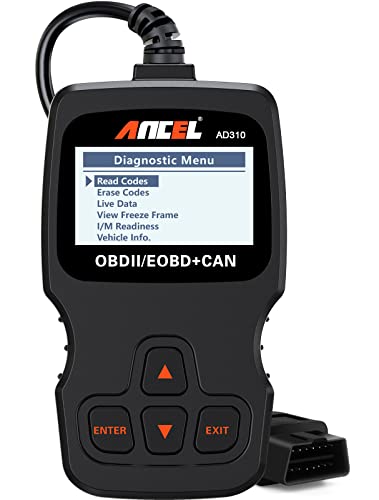 ANCEL AD310Best simple reader
 thinkcar 673BTBest bidirectional
What clearing a code actually does
Clearing a code tells the car's computer to forget a stored fault and turn off the check engine light. It does not repair anything. If the problem is still there, the computer will detect it again and the light will come back, sometimes within minutes and sometimes after a few days of driving.
Clearing also wipes some stored data, such as freeze frame information and the readiness monitors that smog checks look at. That is why you should read and record everything before you erase anything.
What you need before you start
Any OBD2 tool can clear engine codes, but the tools differ in what else they can do. Our best code reader for cars page explains the main types: basic readers show and clear engine codes, scanners add live data and freeze frame, and full-system tools also reach ABS, airbag and transmission modules.
The type you own decides which codes you can clear. For example, the ANCEL AD310 is listed as engine only and wired, so it cannot clear ABS or airbag codes. The BlueDriver Pro is listed as covering engine, ABS/SRS and transmission over Bluetooth, and the THINKCAR 673BT is listed as a full-system tool.
- The scanner or Bluetooth adapter, plus a phone if your tool uses an app
- A pen and paper, or a phone camera, to record codes
- Your vehicle's key or push-button start
- A parked car in a safe, ventilated spot
Step-by-step: how to clear codes
The steps are nearly the same on every tool. Menu names vary, so check your scanner's manual for the exact wording.
- Turn the ignition off and park the car on level ground with the parking brake on.
- Find the OBD2 port. It is usually under the dashboard on the driver's side, often near the steering column.
- Plug in the scanner or adapter. A wired reader gets its power from the port. A Bluetooth adapter needs to be paired with your phone afterward.
- Turn the ignition to the on position without starting the engine. Some tools work with the engine running, but key on and engine off is the usual starting point.
- Read the codes. Write down each code, its description, and the freeze frame data if your tool shows it.
- Look up what the code means and fix the underlying issue first.
- Choose the erase or clear codes option and confirm when prompted.
- Turn the ignition off, wait a few seconds, then turn it on again and rescan to confirm that no codes return.
Check freeze frame and readiness first
Freeze frame is a snapshot of conditions at the moment the fault was logged. It can help you spot patterns, such as a misfire that only happens when the engine is cold. Live data, which shows sensor values in real time, helps you confirm a repair worked.
Readiness status matters if you need a smog check. After codes are cleared, the monitors reset to not ready and need a mix of driving to complete. Many shops will not test a car with incomplete monitors, so avoid clearing codes right before an inspection. Our best obd2 scanner page lists which tools include readiness checks and live data.
Safety notes and common mistakes
Do not clear a code just to pass an inspection or to hide a problem. Warning lights for brakes, airbags and overheating point to safety issues, so have them checked before you drive much further.
Keep the cable and your hands away from belts, fans and hot engine parts if you work with the hood open. Never run the engine in a closed garage, because exhaust contains carbon monoxide.
A flashing check engine light usually signals an active misfire that can damage the catalytic converter, so reduce speed and get the car checked soon.
Do not unplug the scanner while it is clearing or writing data, and do not use a phone app while driving.
If you prefer a wireless setup
A Bluetooth adapter lets you read and clear codes from your phone, which is handy when the port is hard to reach. Models such as the BlueDriver Pro also offer repair reports matched to your vehicle. If that appeals to you, our best bluetooth obd2 scanner page compares the options side by side.
Whatever style you choose, confirm that it supports your vehicle and the systems you want to clear before you buy.
Frequently asked questions
Will clearing the code fix my car?
No. Clearing only erases the stored fault and turns off the light. If the cause remains, the code will return.
Does the check engine light go off right away after clearing?
Usually yes. If the fault is still present, the car's computer can turn it on again once it detects the problem.
Can I clear codes with the engine running?
Some tools allow it, but key on and engine off is the common method. Follow your scanner's instructions.
Why is my car not ready for a smog check after clearing codes?
Clearing resets the readiness monitors. They need a variety of normal driving to complete again before a test.
Can a basic reader clear ABS or airbag lights?
Usually not. Those systems need a scanner that lists ABS or SRS support.