How to Read a Digital Caliper: Inches, Thousandths and Metric
A digital caliper shows the size as a number on its screen, so you read it like a calculator. In inch mode, the digits after the decimal point are thousandths of an inch, and in mm mode they are hundredths of a millimeter. Close the jaws, press zero, measure, and read the full number, including the last digit.
 Kynup 170-2Best overall
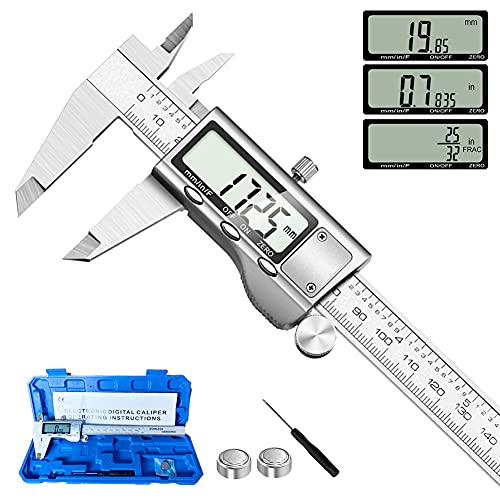 Jiavarry 20-FFour measuring modes
 LOUISWARE Silver Digital CaliperShortest auto-off timer
What the screen is telling you
Unlike a vernier or dial caliper, a digital caliper does the scale math for you. The jaws move, the sensor tracks the distance, and the LCD shows the result. Your job is to read the number correctly and to make sure the caliper was set up well before you measured.
In inch mode, a reading such as 1.250 means one and a quarter inches. The first digit after the decimal point is tenths, the second is hundredths, and the third is thousandths. Machinists often say "thousandths" or just "thou" for that third digit, so 0.032 in is "thirty-two thousandths."
Most screens also show a unit label (in or mm) and sometimes a minus sign. A minus sign means the reading is below your zero point, which is a clue that you zeroed with the jaws at a different spot than you expected.
Set up and zero before every measurement
Most reading mistakes come from setup, not from reading the screen. A few seconds of preparation make every number you read more trustworthy.
- Wipe the jaw faces and the measuring surfaces with a clean, dry cloth. Dust or a chip of metal can add a few thousandths on its own.
- Turn the caliper on and select the unit you want, inch or mm.
- Slide the jaws fully closed. Do not squeeze them hard.
- Press the zero or origin button. The display should read 0.000 in or 0.00 mm.
- Open the jaws, place them on the part, and close them until they touch lightly. Use the thumb roller instead of pushing on the sliding jaw.
- Tighten the locking screw if you want to lift the caliper away without losing the reading, then read the screen.
Reading inches and thousandths
The key is to read the whole display, left to right, without rounding in your head. Say the number out loud if it helps: whole inches, then the decimals as a single count of thousandths.
Accuracy and resolution are two different things here. Every model on our best digital caliper page lists an accuracy of 0.001 in, which tells you how far a reading may stray from the true size. Resolution is only the size of the smallest step on the display. Some listings show 0.0005 in resolution, and the HARDELL lists 0.0004 in. A finer step looks more precise, but it does not make the caliper more accurate. Treat the final digit as a hint, not a guarantee.
If your display shows a last digit that jumps in steps of 5, such as 0.2505, you are looking at a half-thousandth resolution. Read it as 250 and a half thousandths, then keep in mind that the true size could still differ by up to the accuracy figure.
| Display (in mode) | How to say it | In millimeters |
|---|---|---|
| 0.032 | 32 thousandths | 0.81 mm |
| 0.250 | 250 thousandths, or a quarter inch | 6.35 mm |
| 1.000 | One inch | 25.40 mm |
| 1.500 | One and a half inches | 38.10 mm |
Reading millimeters
Metric mode is often easier. A reading like 12.45 means 12 millimeters and 45 hundredths. The listings for the Kynup, Jiavarry, LOUISWARE and HARDELL models all give a metric accuracy of 0.02 mm, and several list a 0.01 mm display step.
The two units connect through one fact: 1 inch equals 25.4 millimeters. You can switch the caliper between units with one button, which is the easiest way to convert. Measure once, press the unit key, and read the same size in the other system. There is no need to measure twice.
Metric mode is the better choice for 3D printing, electronics and any part drawn in millimeters. Inch mode suits older plans, hardware sold in inches and most US machining drawings.
What fraction mode does
Some calipers add a third mode that shows the size as a fraction of an inch. Of the models in our data, the Kynup and Jiavarry list inch, mm and fraction modes, while the LOUISWARE, HARDELL and iGaging list inch and mm only. Fraction mode is handy for woodworking, where plans and lumber are often given in fractions such as 3/4 or 5/8.
Fraction displays are usually rounded to a set step, so they are less exact than the decimal reading. Check your manual for the step your model uses. For anything that needs a tight fit, switch back to decimal inches and read the thousandths.
Choosing the right jaws for the job
A caliper can take four kinds of measurements. Knowing which jaw to use keeps you from reading the wrong feature. Our digital caliper comparison notes that the Jiavarry and HARDELL list two jaw sets and a depth probe for these jobs.
Outside jaws grip the outside of a part, such as the width of a block or the diameter of a rod. Inside jaws, the small upper pair, measure the inside of a hole or slot. The depth probe at the end of the beam measures how deep a hole or recess is. The step feature measures the height of a shoulder.
- Outside: place the part deep in the jaws, not at the tips, for a steadier reading.
- Inside: open the small jaws inside the hole until they touch both sides, then rock slightly to find the widest point.
- Depth: rest the end of the beam flat on the top edge and lower the probe until it touches the bottom.
- Step: rest the sliding jaw on the high surface and the fixed jaw on the low one.
Tips for steady readings and safety
Apply the same light pressure each time. Squeezing harder bends the jaws slightly and changes the number. Measure a round part at two or more angles, since it may not be perfectly round. Recheck your zero after a drop, a battery change or a long break. Many models shut off on their own, with the listings giving 4 or 5 minutes of inactivity, so confirm the zero after waking the caliper.
Handle the tool carefully. The jaw tips can be sharp, and metal burrs on parts can cut fingers. Never measure a part that is moving or powered, such as a spinning shaft or a running motor. Wear safety glasses when you measure around cutting, grinding or drilling, since chips and sparks fly. Ear protection is also wise in loud shops.
Calipers use small button cells. Keep spare batteries away from children and pets, because swallowing one is dangerous and needs urgent medical care. Store the caliper in its case if one is included, with the jaws slightly open to avoid pressure on the faces.
Frequently asked questions
Why does my caliper not show 0.000 when the jaws are closed?
The zero may simply not be set. Clean the jaws, close them gently and press the zero button. If it still drifts, the battery may be weak or there may be dirt on the scale.
Is a caliper with a finer display step more accurate?
No. The display step only tells you how small a change the screen can show. Accuracy is the stated margin of error, and it is a separate spec.
Can I use a digital caliper to measure a hole depth?
Yes, if it has a depth probe at the end of the beam. Rest the beam on the edge of the hole and extend the probe to the bottom before you read the screen.
What does a negative number on the display mean?
It means the jaws are measuring below the zero point you set. Close the jaws, press zero again and remeasure.