How to Properly Use a Car Code Reader
Plug the reader into the OBD2 port under the dashboard with the ignition off, turn the key to on without starting the engine, then follow the prompts to read the codes. Write down each code and the freeze frame data before you clear anything, and clear the light only after the problem is fixed.
 BlueDriver LSB2Best overall
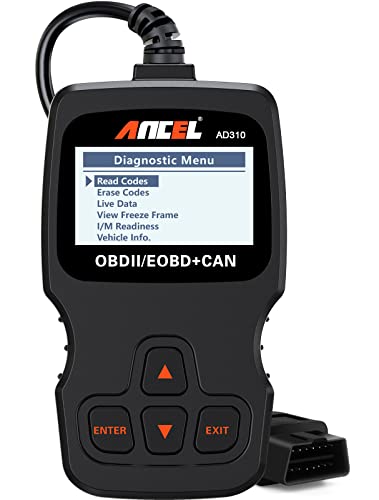 ANCEL AD310Best simple reader
 thinkcar 673BTBest bidirectional
What a code reader actually does
A car code reader talks to your vehicle's computer through the OBD2 port. When the computer detects a fault, it stores a trouble code and may turn on the check engine light. The reader pulls that code out and shows it to you.
Basic readers cover engine codes. Better scanners add live data, freeze frame and smog readiness checks, and full-system tools can also read ABS, airbag and transmission modules. Which kind you own decides how much you can check, so read your tool's manual for its limits.
Before you plug in
A little prep prevents most problems. Park on level ground, set the parking brake and make sure the vehicle is in park or neutral. Keep the key out of the ignition until the reader is connected.
Most cars built for North America from 1996 on have an OBD2 port. For example, the BlueDriver Pro lists support for gas vehicles from 1996 and newer, and the ANCEL AD310 supports OBDII vehicles only, not older OBDI ones. Check your own tool's compatibility notes before you start.
- Find the port, usually under the dashboard on the driver's side, often near the knee area or behind a small cover.
- Make sure the ignition is off before you connect.
- Have a notepad or your phone ready to record codes.
- If you use a Bluetooth reader, install its app and enable Bluetooth on your phone first.
Step-by-step: reading your codes
The steps are nearly the same for every reader. The main difference is whether you look at a handheld screen or your phone.
- Connect the reader to the OBD2 port. A handheld unit with a cable, such as the ANCEL AD310 with its 2.5 ft cable, draws power from the port, so it needs no batteries.
- Turn the ignition to the on position without starting the engine. The dashboard lights should come on.
- Wait for the reader to power up and link to the vehicle. Some tools ask for the VIN or let you read it automatically.
- Choose the option to read codes, often labeled Read Codes or DTC.
- Write down every code, including any marked pending or stored.
- Look at the freeze frame data if your tool offers it, and record it too.
Understanding what you see
A trouble code is a letter followed by four digits. The letter shows the system: P for powertrain, B for body, C for chassis and U for network. Your reader may show a plain-language description, and some tools, such as the ANCEL AD410 with its 42000-code database, include a built-in lookup.
Freeze frame data is a snapshot of conditions when the fault was logged, such as engine speed and temperature. It helps you work out when the problem happens. Live data shows sensor values in real time, which is useful for watching how a part behaves as you drive. Treat a code as a clue, not a verdict. A code for an oxygen sensor, for instance, can come from the sensor itself or from a problem elsewhere.
Different tools reach different systems. This table summarizes a few from our data.
| Tool | Systems covered | Connection | Live data | Freeze frame |
|---|---|---|---|---|
| BlueDriver Pro | Engine, ABS/SRS, transmission | Bluetooth | Yes | Yes |
| ANCEL AD310 | Engine only | Wired | Yes | Yes |
| THINKCAR 673BT | Full system | Bluetooth | Yes | Yes |
| ANCEL AD410 | Engine only | Wired | Yes | Yes |
Fixing the problem, then clearing the code
Look up the code, find the likely cause and repair it first. Clearing a code without a fix just hides the warning, and the light will usually return. Clearing also erases freeze frame data, which is why you record it first.
After the repair, use the Clear Codes option and confirm. Turn the ignition off, wait a moment, then restart the engine and check that the light stays off. If you need to pass a smog check, use the I/M readiness function. Clearing codes resets the monitors, so they may need some normal driving before they show ready. Our best code reader for cars page lists which tools include readiness checks.
Safety and common mistakes
Never operate the reader while driving unless a passenger runs it. Route the cable away from pedals and the steering wheel. Keep your hands, hair and clothing clear of moving engine parts and the cooling fan. Hot exhaust and engine parts can burn, so let the engine cool before working near it. Run the engine only outdoors or with proper ventilation, since exhaust contains carbon monoxide.
If a code points to brakes, airbags or steering, do not guess. Have a qualified technician handle it. Airbag systems in particular can be dangerous to work on. Wear safety glasses when you work under the hood.
Common mistakes include clearing codes before writing them down, ignoring pending codes, and buying a reader that cannot reach the system you need to check. If you are still choosing a tool, our code reader comparison shows engine-only, full-system, wired and Bluetooth options side by side.
Frequently asked questions
Can I leave the reader plugged in all the time?
Wired handheld readers should be unplugged after use. Some Bluetooth dongles are made to stay connected, but check your tool's instructions, since a constant connection can draw power from the vehicle.
Why does my reader say no codes when the light is on?
The code may be in a system your tool cannot read. An engine-only reader will not show ABS, airbag or transmission faults. Try a tool that covers more systems.
Will clearing codes fix the problem?
No. It only erases the stored code. If the fault is still present, the computer will log it again and the light will come back.
Do I need to start the engine to read codes?
Usually the ignition on with the engine off is enough for reading stored codes. Live data needs the engine running, so follow your tool's prompts.