How to Change the Blade in a Utility Knife
To change a utility knife blade, retract the blade, release the old one using the knife's button, latch or screw, drop in a fresh blade with the cutting edge facing the right way, and make sure it locks before you cut. Most modern knives need no tools, but older or budget models may need a screwdriver. Always handle blades with the edge pointed away from you, and wear cut-resistant gloves if you have them.
 WORKPRO W013053Best overall
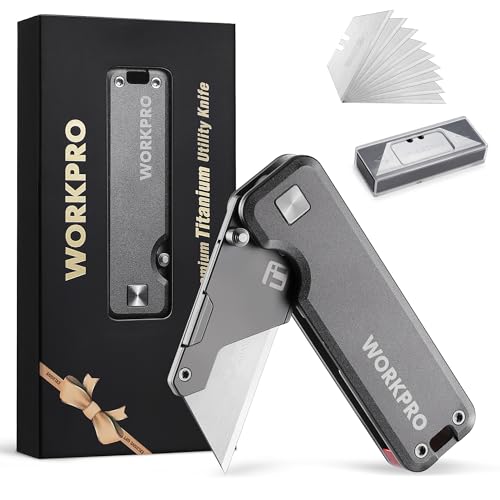 WORKPRO W011073Lightest in the lineup
 EQUIPTZ UK1Auto reload blade storage
Before you start: set up safely
A fresh blade is sharp enough to cut deeply with very little pressure, and the old one is still sharp too. Take a minute to prepare so the swap goes smoothly.
Work on a flat, stable surface with good light. Retract the blade fully, or fold the knife closed, before you open any part of the body. If the knife has a lock, engage it only when the instructions for your model say to. Cut-resistant gloves are a good idea, and safety glasses are worth wearing if your knife uses blades that snap or spring out.
- Retract the blade or close the folder.
- Clear the work surface of anything you could knock into.
- Put on gloves and eye protection.
- Have a puncture-proof container ready for the old blade, such as a sturdy jar or a dedicated blade bank.
Work out which type of knife you have
The steps differ a little depending on how the blade is held. Check the body for a button, a latch, a seam with a screw, or a slider that comes out of the handle. If you have the manual, it will show the exact release point.
Most utility knives use one of three systems: a quick-release button, a screw or thumb-screw that clamps the blade, or a blade carrier that slides out of the handle. The table below shows how some knives from our published specifications handle the swap.
| Knife | Blade design | How the swap works, per the listing |
|---|---|---|
| WORKPRO W013053 | Retractable | Quick-release button; 10 extra blades included |
| EQUIPTZ UK1 | Retractable | Top quick-change button, then slide the blade control back and forward to auto-load a new blade from on-board storage |
| WORKPRO W011056 | Folding | Push up on the button and pull the blade out; compatible with most standard-size utility blades |
| Fiskars 770030-1001 | Folding | Blades snap in and out for quick replacement |
| Klein Tools 44306 | Folding | Holds an additional blade in the handle; tool-free changing is not stated in the listing |
Changing a blade with a quick-release button
This is the easiest system, and it keeps your fingers well away from the edge. Many of the knives on our best utility knife page list tool-free changes, and the process is similar across them.
Always follow your model's manual if it differs from these general steps.
- Retract the blade fully so only the handle is in your hand.
- Press or push the release button as the instructions describe. The blade should loosen or slide free.
- Pull the old blade out by the blunt back edge, or tip it straight into your disposal container.
- Take the new blade by its sides, edge pointing away from you, and slide it into the same channel the old one came from.
- Push it in until you feel or hear it seat, then give it a gentle tug to confirm it is held.
- Extend the blade a notch and test it on scrap cardboard.
Changing a blade on a screw-type knife
Some knives, especially older metal-bodied ones, split into two halves held by a screw. These usually need a Phillips or flat screwdriver, depending on the screw head.
Lay the knife flat and back the screw out just far enough to open the body. Keep the screw somewhere it cannot roll away. Lift out the blade slider and the old blade together, then separate them by the blunt end. Seat the new blade on the slider the same way the old one sat, close the halves, and tighten the screw snugly without forcing it.
If the slider rattles afterward, the screw is probably a little loose. If the halves will not close, the blade is likely not seated flat in the channel.
Check the blade before you cut
A few seconds of checking prevents most blade-change problems. Confirm that the blade sits flat, the edge faces the front, and nothing wobbles when you press the side lightly.
On folding knives, check that the lock engages every time you open the blade. Our buying guide notes that a lock keeps the blade from folding or sliding back while you cut, and the lock type is worth confirming on any knife you are considering. Retractable knives hold the blade with a slider instead, so test that the slider stays in position under light pressure.
Make a first cut on scrap material rather than your project. A new blade can feel surprisingly aggressive, so start with light pressure and let the edge do the work.
When to change the blade, and what to do with the old one
Change the blade as soon as it tears instead of slicing, drags through the material, or needs noticeably more pressure. A dull blade slips, and extra force is how most cutting accidents happen. Swapping early is the safer habit.
If your knife has on-board storage, keep spares inside the handle where they stay clean and close at hand. Our utility knife comparison shows blades included and storage side by side, since both affect how easy it is to swap often. For example, the EQUIPTZ UK1 lists storage for 10 SK5 blades, while the Klein Tools 44306 lists storage plus 3 blades included.
Never toss a loose blade into a trash bag, where it can cut someone later. Slide it into a puncture-proof container, tape the container shut when it fills, and dispose of it according to your local rules.
Frequently asked questions
Can I use any brand of blade in my utility knife?
Often yes, but not always. Some listings say their knives accept most standard-size utility blades, and others use their own style. Check your knife's manual or listing, and match the blade shape and slot pattern before buying spares.
Which way does the blade face?
The cutting edge faces the front or the open end of the knife, away from the handle. The notches or slots in the blade must line up with the pegs or tabs in the carrier. If it does not seat easily, flip it and try again rather than forcing it.
Is it safe to flip a blade and use the other side?
Only if your blade is designed for it. Some blades are marketed as double-use, as the WORKPRO listings describe. Single-edge blades have a spine on the back and should not be reversed.
What if the old blade is stuck?
Check that the release button is fully pressed and that the blade is not caught on a burr in the channel. Do not pry with your fingers. If it still will not move, open the body if your model allows and lift the blade out by the blunt end.