How to Change the Battery in a Welding Helmet
Most auto-darkening helmets use a small lithium coin cell. The helmets on our spec sheet that list battery details use a CR2450. To change it, remove the lens cartridge or battery cover, pop out the old cell, fit a new one with the plus side facing the right way, and test the lens before you strike an arc.
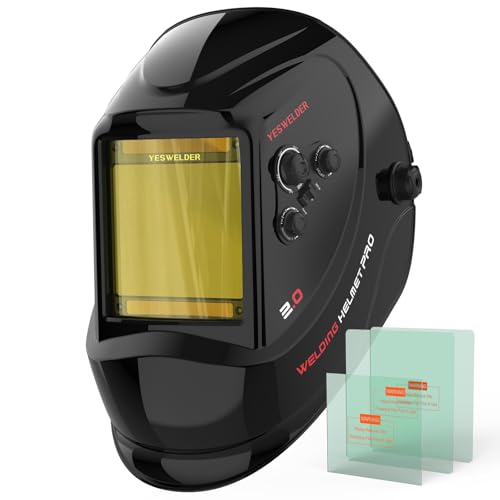 YESWELDER LYG-M800HBest overall
 ARCCAPTAIN Best with built-in light
 YESWELDER LYG-L600A-ABest certified budget
What size battery does a welding helmet use?
The battery type depends on the model, so check the manual or the label on the lens cartridge first. Many auto-darkening helmets use a lithium coin cell, and the size is printed on the old battery itself.
On our comparison data, the helmets that list battery details all use a CR2450 lithium cell, backed up by solar panels. That includes the YESWELDER LYG-M800H, the YESWELDER LYG-L600A, the ARCCAPTAIN with built-in light and the ARCCAPTAIN GT995. If you are still choosing a helmet, our best welding helmet page shows the power source for each model.
| Helmet | Battery listed | Power source |
|---|---|---|
| YESWELDER LYG-M800H | CR2450 lithium | Solar + replaceable battery |
| ARCCAPTAIN with light | CR2450 lithium | Solar + replaceable battery |
| YESWELDER LYG-L600A | CR2450 lithium | Solar + replaceable battery |
| ARCCAPTAIN GT995 | CR2450 lithium | Solar + replaceable battery |
Safety checks before you start
The battery job is simple, but you are working on the part that protects your eyes. Take a minute to set up properly.
- Work with the helmet cool, dry and away from any welding, grinding or cutting area.
- Put the helmet on a clean bench with the lens facing down on a soft cloth so the front lens does not scratch.
- Do not use metal tools that could short the cell or scratch the circuit board. A plastic pry tool or your fingernail is safer.
- Keep coin cells away from children and pets. Swallowed lithium cells can cause serious harm and need urgent medical attention.
- Never weld, or even strike an arc briefly, with a helmet you suspect is not darkening.
How to change the battery step by step
Layouts differ between brands, so treat these steps as the general pattern and follow your manual where it differs. Some helmets have a small battery door on the lens cartridge. Others need the cartridge removed from the shell first.
Have the new cell ready before you open anything, so you do not lose track of the old one's orientation.
- Turn the helmet over and look inside. Find the lens cartridge and any battery cover or compartment.
- If your model has cheater lens mounts or retaining tabs, release them. Many designs use tabs you press toward each other.
- Remove the cartridge or open the battery cover gently. Do not force it, because the plastic clips can snap.
- Note which side of the old battery faces up. Most coin cells sit with the plus side (the flat, marked side) facing out.
- Slide or pop out the old cell. If it is tight, use a plastic tool and avoid touching the circuit board.
- Insert the new cell in the same orientation. Make sure it sits flat and the holder grips it firmly.
- Close the cover or refit the cartridge, and make sure every tab clicks into place.
- Test the lens (see below) before you put the helmet back into service.
How long do welding helmet batteries last?
There is no single number, because battery life depends on the helmet, how often you weld and how much light reaches the solar panels. Many helmets pair a solar cell with a replaceable battery. The solar panels help power the lens while you weld, which is why a lithium cell in this kind of helmet is often treated as a long-life part rather than a frequent replacement.
Instead of waiting for a fixed date, watch for signs. The lens may stay dark or light, react slowly, flicker, or fail to adjust when you change shade. A low-power indicator light on some models is another cue. If any of these show up, replace the cell and test again.
Storing the helmet in a dark cupboard for a long stretch is fine, but keep it away from heat. Heat is harder on any battery than normal use.
How long does a welding helmet take to charge?
For the helmets covered here, charging is not the usual question. They use solar panels with a replaceable battery, so you swap the coin cell rather than plug the helmet in. There is no listed charge time for the lens itself.
The exception is a helmet with a USB-powered light. The ARCCAPTAIN with built-in light has a USB LED light on top that ships uninstalled. That light runs separately from the lens battery, so charging or powering it does not replace the CR2450. Check the instructions for any charge time on the light, and do not assume it applies to the lens.
How to test the helmet after the swap
A new battery only helps if the lens is working. Many helmets have a test button or a shade selector. If yours does, use it to confirm the lens darkens and lightens.
If there is no test button, expose the sensors to a bright light as your manual describes, and watch for the lens to change. Do not use an actual weld as your first check unless the lens has already proven it works.
Also confirm the shade setting and sensitivity are where you want them. A battery swap sometimes happens at the same time as the knobs get bumped. Wide shade ranges such as DIN 5 to 13 on the ARCCAPTAIN GT995 cover most work, but you still need to choose the right shade for the job.
If a new battery does not fix the problem
Check that the cell is seated flat and that the contacts are clean. A coin cell that sits slightly crooked can look installed but not connect.
Next, look at the front lens and the sensors. A dirty or spatter-covered outer lens can block light. Sensors blocked by your hand, the torch or the helmet shell can also make the lens slow to darken. Helmets with more arc sensors, such as the four on the YESWELDER LYG-M800H, handle partial blocking better than the two on the YESWELDER LYG-L600A.
If the lens still behaves strangely after a fresh battery and cleaning, stop using the helmet. Contact the maker or replace the cartridge or the helmet. A lens that does not switch reliably is not worth the risk to your eyes. When you shop for a replacement, compare sensors, shade range and certification on our best welding helmet page.
Frequently asked questions
Can I use a different coin cell if I cannot find the right one?
No. Use the exact type the manufacturer specifies. A cell with a different size or voltage may not fit, may not power the lens correctly or may damage it.
Do I need to take the helmet apart to reach the battery?
It depends on the model. Some have an accessible cover, while others need the lens cartridge removed. Your manual will show which. Avoid disassembling anything the manual does not mention.
Should I replace the battery before it dies?
If your lens ever lags, flickers or fails to switch, replace it right away. Some welders also swap it on a regular schedule as a precaution, which is a reasonable habit if you weld often.
How do I dispose of the old battery?
Do not throw lithium cells in the household trash. Take them to a battery recycling drop-off or a local hazardous waste collection point. Tape over the terminals if you need to store it first.