How to Change a Box Cutter Blade Safely, Step by Step
To change a box cutter blade, retract the blade fully, release the blade holder (with a button, a latch or a screw, depending on the model), slide the old blade out, and seat a new one in the same orientation. Then lock the cutter closed and test the blade before cutting. Tool-free models take seconds, while screw-type models need a small screwdriver.
 WORKPRO W013053Best overall
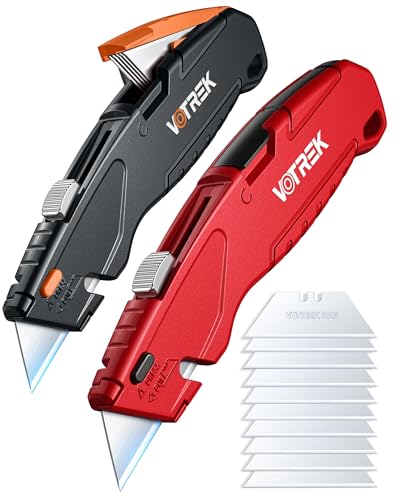 VOTREK UK003Best for one-handed use
 WORKPRO W011047Most blades included
Before you start: get set up safely
A fresh blade is very sharp, and a dull one is only slightly safer. Most blade injuries happen during the swap, so spend a minute on setup.
Work on a flat, stable surface with good light. Keep your free hand well away from the blade path, and never hold the cutter against your body while you pull a blade out.
- Retract the blade all the way into the body, or fold the knife closed, before you touch anything.
- Wear cut-resistant gloves if you have them, and safety glasses, because a spring-loaded blade or a snapped tip can fly.
- Keep a sturdy container nearby for the old blade. A small metal tin or a bottle with a narrow opening works well.
- Set the cutter down while you reach for the new blade, so you are never holding both at once.
Know which type of cutter you have
Blade changes differ by design, and the quickest way to avoid frustration is to identify yours first. Look for a release button, a thumb latch, or a screw on the side of the handle.
If you are still choosing a tool, a quick-release button saves the most time. Our best box cutter page shows which models list tool-free blade changes in the spec table, and notes that some makers do not publish it.
| Type | How the blade comes out | What you may need |
|---|---|---|
| Retractable with release button | Press the button, then slide the blade out of the carriage | Nothing |
| Folding knife with release button | Open the knife, press the button, lift the blade out | Nothing |
| Retractable with a screw | Undo the screw, open the body, lift out the blade | Small screwdriver |
| Snap-off style | Blade is scored into segments and snaps off at the tip | Pliers or the built-in snapper |
How to remove the old blade
The exact motion varies, but the basic idea is the same on most cutters. The blade sits in a slot in a carriage, and one release lets it free.
If your manual is gone, check the maker's site for a diagram. Do not pry at the body with a knife tip, since that is how fingers get cut.
- Slide the blade out to its shortest position, then lock or retract it fully.
- Find the release. On many retractable models this is a button on the top or side of the body.
- Press and hold the button while you slide the blade forward or back along its track.
- If your cutter uses a screw, undo it, open the two halves of the handle, and note how the blade and spare blades sit before you lift anything out.
- Pinch the old blade by its flat sides, away from the edge, and drop it straight into your disposal container.
How to install the new blade
Pick up a new blade by its flat sides only. Most utility blades are symmetrical trapezoids, but check which edge faces forward and make sure the notches line up with the carriage.
Slide the blade into the track until it seats with a small click or until the button pops back up. Release the button and give the blade a light tug with the cutter on the table to confirm it is locked. Then extend and retract the blade once or twice to make sure it moves smoothly.
If the blade wobbles, it is probably not seated. Remove it and try again rather than forcing the slider.
Examples from published specs
Different cutters handle this step in slightly different ways, so it helps to know what to expect. The WORKPRO W013053 retractable knife lists a quick-release button and includes 10 spare blades, and it weighs 3.2 oz with a 6.3 in closed length.
The EQUIPTZ UK1 retractable cutter stores 10 blades in the body. Its listing says you press a top button to remove the old blade, then slide the blade control back and forward to auto-load the next one.
The WORKPRO red folding knife (W011047) lists a release button for blade swaps. It stores 3 blades in the handle and comes with a case holding 10 more, for 13 blades in all, and it folds to 4.5 in. You can compare these and others side by side on our box cutter comparison.
How to open and close your box cutter
Opening and closing are simple, but they are the steps people rush. On a retractable cutter, you push the slider forward to the length you need, usually in a few set positions. To close it, pull the slider all the way back until the blade is inside the body.
On a folding knife, release the lock (a button, a thumb rest or a dual lock, depending on the model), swing the blade out until it locks, and confirm the lock before cutting. To close it, release the lock and fold the blade into the handle with your fingers clear of the edge.
Always close the cutter before you put it down or in a pocket.
Troubleshooting and disposal
If a blade will not come out, check that the cutter is fully retracted and that you are pressing the right release. Dirt and tape residue can jam the track, so wipe it with a dry cloth, never your fingers.
Change the blade when you notice tearing, extra pressure or a ragged cut. Dull blades slip more, so replacing them sooner is safer.
Dispose of used blades in a rigid, sealed container, and label it so no one reaches in by mistake. Do not put loose blades in a trash bag. Check your local rules for sharps, since they vary.
Store spare blades in their case or in the handle's storage area, away from children.
Frequently asked questions
How often should I change my box cutter blade?
There is no fixed schedule. Change it when cuts start to tear, you need more force, or the edge looks chipped or rounded.
Can I flip a blade over to use the other edge?
Only if the blade is made for it, such as a double-use blade. Otherwise swap in a fresh blade, and remember the used edge is still sharp.
Do all box cutters use the same blades?
No. Many use common trapezoidal utility blades, but sizes and notches vary. Check your cutter's manual or listing for compatible blades.
What if the blade release button is stuck?
Make sure the blade is retracted, clean any dust from the button and track, and press firmly. If it still sticks, stop and check the manufacturer's instructions.