How Do Code Readers for Cars Work?
A car code reader plugs into the OBD2 port under the dashboard and asks the car's computers what faults they have stored. It reads the trouble code, shows or explains it, and can clear the check engine light after a repair. Basic models cover the engine only, while better ones add live data and other systems like ABS, airbag and transmission.
 BlueDriver LSB2Best overall
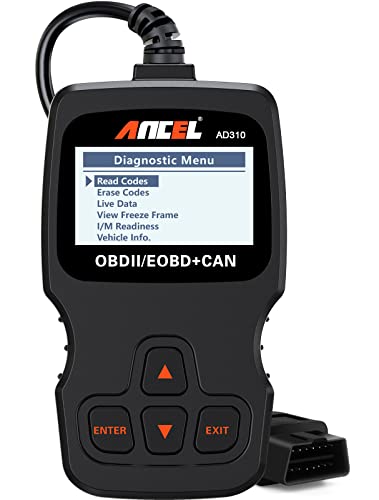 ANCEL AD310Best simple reader
 thinkcar 673BTBest bidirectional
What a code reader actually is
A code reader is a small diagnostic tool that talks to your car's onboard computers. OBD stands for onboard diagnostics, and OBD2 is the standardized version used on gas vehicles sold in North America since 1996. Because the port and the basic codes are standardized, one reader can work across many makes and models.
You will hear the terms code reader, code scanner and OBD reader used almost interchangeably. In practice, a code reader shows and clears codes, while a scanner adds extras such as live data and tests. Our best code reader for cars page lines both types up on one spec sheet.
How the car creates a trouble code
Your car is full of sensors that measure things like oxygen in the exhaust, engine temperature and airflow. The engine control unit, the car's main computer, constantly compares those readings with what it expects to see.
When a reading stays outside the expected range, the computer stores a diagnostic trouble code, or DTC, and may turn on the check engine light. The code points to the area of the problem, such as a sensor circuit or a misfire. It does not always name the exact broken part, so it is a starting point for diagnosis.
What happens when you plug it in
The reader sends a request over the car's data network and the computers answer. Different cars use different communication protocols, and a good reader handles them automatically. For example, the ANCEL AD310 lists support for KWP2000, J1850 VPW, ISO9141, J1850 PWM and CAN.
The whole process usually follows the same steps:
- Turn the ignition off and find the OBD2 port, usually under the dashboard on the driver's side.
- Plug in the reader, then turn the ignition to the on position, or start the engine if the tool asks.
- Let the reader connect and identify the vehicle.
- Choose the option to read codes and note each code it shows.
- Look up or read the description, then repair the problem.
- Clear the codes only after the repair, then confirm the light stays off.
What the reader can show you
Beyond the code itself, many readers pull extra information from the car. Freeze frame captures the conditions at the moment the fault was logged, such as what the engine was doing. Live data shows sensor values in real time. I/M readiness tells you whether the car's emission monitors have finished, which matters before a smog check.
Some tools add repair help. The BlueDriver Pro, for example, lists technician-verified repair reports matched to your VIN, with definitions, causes and fixes. The ANCEL AD410 lists a 42,000-code database for looking up definitions, plus O2 sensor and EVAP tests.
Basic readers versus fuller scanners
How much a tool can see depends on which systems it can talk to. The table below uses figures from our spec sheet.
Engine-only tools read emission-related engine codes. Tools that cover more systems can also read modules for ABS, airbags and the transmission.
| Tool | Systems covered | Connection | Live data | Weight (lb) |
|---|---|---|---|---|
| BlueDriver Pro | Engine, ABS/SRS, transmission | Bluetooth | Yes | 0.13 |
| ANCEL AD310 | Engine only | Wired | Yes | 0.75 |
| ANCEL AD410 | Engine only | Wired | Yes | 0.66 |
| THINKCAR 673BT | Full system | Bluetooth | Yes | 1.68 |
Choosing and using one safely
Pick a reader based on what you want to fix. If you only want to know why the check engine light is on, an engine reader is enough. If you want to look at brakes, airbags or the transmission, look for broader system coverage. Bluetooth dongles use your phone, while handheld units work on their own. Our code reader comparison covers each type in more detail.
A few safety notes apply whenever you plug in a tool:
- Do not scan or clear codes while driving unless a passenger operates the tool. Keep your eyes on the road.
- Park on level ground with the parking brake set before testing, and keep the car outdoors or in a ventilated space if the engine is running.
- Never clear codes just to turn off the light. The fault is still there and may cause damage or fail a smog check.
- Airbag and brake codes are safety items. If they show up, have the system inspected before relying on it.
- Be careful around moving belts, fans and hot parts if you look under the hood while the engine runs.
Frequently asked questions
Will a code reader tell me exactly which part to replace?
Not always. A code points to a system or circuit where a reading is off. The cause could be the part, its wiring or something else, so check further before buying parts.
Can a code reader drain my car battery?
The reader draws a small amount of power from the port while connected. It is best to unplug it when you are done, especially a Bluetooth dongle that you will not use for a long time.
Does clearing a code fix the problem?
No. Clearing only erases the stored code and turns off the light. If the fault is still present, the code and light will usually come back.
Will a reader work on my older car?
Most readers cover gas vehicles from 1996 and newer with an OBD2 port. Cars built before that often use older systems that these tools do not support, so check the product's compatibility notes.