How Accurate Are Digital Calipers? What the Specs Really Mean
A typical digital caliper is accurate to about 0.001 in (0.02 mm) over a 6 inch range. That is plenty for woodworking, 3D printing, repairs and most machining checks. Your technique, a clean tool and a correct zero matter as much as the number on the box.
 Kynup 170-2Best overall
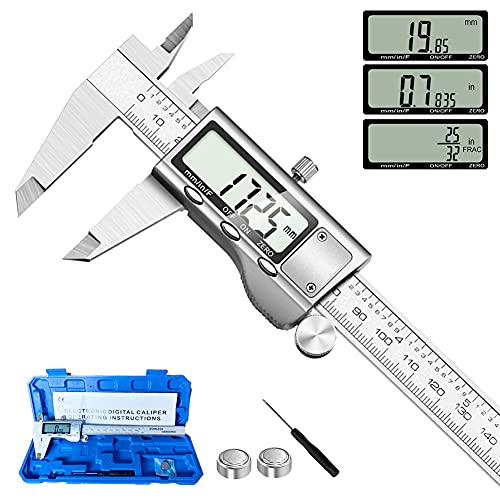 Jiavarry 20-FFour measuring modes
 LOUISWARE Silver Digital CaliperShortest auto-off timer
What accuracy means on a digital caliper
Accuracy tells you how far a reading may stray from the true size. If a caliper lists 0.001 in, a measurement can be off by up to that much in either direction. That is about the thickness of a sheet of printer paper, so it suits most home and shop work.
Every model on our best digital caliper page lists 0.001 in accuracy (0.02 mm). The listings for Kynup, Jiavarry, LOUISWARE, HARDELL and iGaging all state the same figure. So accuracy alone will not separate these tools, and build and features matter more.
Accuracy vs. resolution
These two terms get mixed up often. Resolution is the smallest step the display can show. Accuracy is how close the reading is to the real size. A display can show tiny steps and still be wrong by a larger amount.
For example, HARDELL lists 0.0004 in resolution, while Jiavarry, LOUISWARE and iGaging list 0.0005 in. All four still list the same 0.001 in accuracy. The finer display step does not make the HARDELL more accurate. It only shows smaller numbers.
Think of it like a bathroom scale that shows tenths of a pound but is off by a full pound. The extra digit looks precise, but it does not make the answer more correct.
Are digital calipers more accurate than dial calipers?
Not by default. Both types can reach about 0.001 in when they are well made and used with care. The main difference is how you read them. A digital display removes the guesswork of reading a needle between marks, so reading mistakes are less likely.
Digital calipers also switch between inch and mm with one button, and they can zero at any point. That helps with comparison checks. Dial calipers have no battery and do not mind dust as much, which some people like in rough conditions.
If you want the easiest reading, go digital. If your shop is dusty or you hate battery swaps, a dial model can make sense. Neither one is a clear winner on raw accuracy.
What can throw off your readings
The tool is only part of the story. Most bad readings come from how the caliper is used. Here are the common causes:
- Dirty jaws. Dust, oil or chips between the faces change the reading. Wipe the jaws before use.
- A wrong zero. Close the jaws fully and press ZERO before each measurement. Kynup and HARDELL both advise this in their listings.
- Too much pressure. Squeezing hard flexes the jaws and the part. Use light, steady force.
- A tilted tool. If the caliper is not square to the part, you read a longer size than the true one.
- A weak battery. Low power can cause a flickering or drifting display. Replace the cell if the numbers jump.
- Temperature. A warm hand or a cold part can shift size slightly, so let both settle to room temperature.
Features that help keep readings steady
Some features protect accuracy over time rather than adding to the base number. A stainless steel body resists rust and wear better than plastic. Six of the seven models on our comparison page list stainless steel, including all five covered here.
A hard case protects the jaws between jobs. Kynup, HARDELL and iGaging include one. Dust and splash protection helps too. Kynup and iGaging list IP54 or higher, Jiavarry and LOUISWARE say splash resistant, and HARDELL states no rating.
The iGaging also lists absolute origin, which keeps the zero reference after power-off. Its SPC/USB data port can send readings straight to a computer, which cuts typing errors. Auto-off timers save battery. LOUISWARE shuts off after 4 minutes, and the others that list it use 5.
How to check your caliper
You do not need a lab to spot a problem. A quick routine catches most issues. Follow these steps:
1. Clean the jaws with a lint-free cloth.
2. Close the jaws gently and press ZERO. The display should read 0.000.
3. Measure a known reference, such as a gauge block or a drill blank with a stated size, and compare the result.
4. Repeat the reading a few times. The numbers should match each time.
5. Check both outside and inside jaws if you use both.
If readings drift or do not repeat, change the battery and clean the slide. If the problem stays, replace the tool. A caliper that cannot hold zero is not worth trusting for close fits.
Which caliper fits your job
Since the listed accuracy is the same across these models, choose by use. The table below sums up the points that differ.
Safety note: wear eye protection when measuring parts near cutting, grinding or sanding, and never measure a part while it is moving or powered.
| Need | Look for | Example from our data |
|---|---|---|
| Woodworking with fractions | Fraction mode | Kynup, Jiavarry |
| Rough or damp shop | IP54 or higher rating | Kynup, iGaging |
| Logging data | Data output port | iGaging |
| Jaw protection | Included case | Kynup, HARDELL, iGaging |
| Finest display step | Lowest resolution | HARDELL at 0.0004 in |
Frequently asked questions
Is 0.001 inch accurate enough for 3D printing?
Yes. Printed parts usually vary by more than that, so a caliper with 0.001 in accuracy is more than enough to check filament, walls and hole sizes.
Do I need to calibrate a new digital caliper?
Most do not need it. Just clean the jaws, close them and press ZERO. Then check a known reference size to confirm the reading.
Why does my caliper reading change when I press harder?
Pressure flexes the jaws and can squash soft parts. Use the thumb roller and a light, steady touch for repeatable results.
Can a 6 inch caliper measure inside and depth sizes?
Yes, most can. Jiavarry and HARDELL list two jaw sets and a depth probe, which cover outside, inside, depth and step readings.