Do You Start Your Car When Using a Code Reader?
No, you usually don't need to start your car to read trouble codes. Plug the reader into the OBD2 port, turn the key or push-button to the ON position (dashboard lights on, engine off), and run the scan. Start the engine only when you want live sensor data or readiness checks, and do it in a well-ventilated spot.
 BlueDriver LSB2Best overall
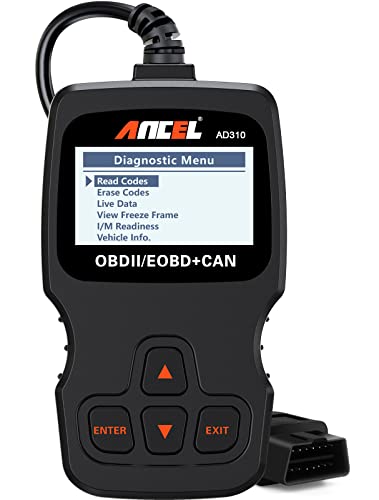 ANCEL AD310Best simple reader
 thinkcar 673BTBest bidirectional
The short version: key on, engine off
For reading stored codes, the standard approach is "key on, engine off." The OBD2 port supplies power to the reader, and the car's computer wakes up when the ignition is on. That is enough for the reader to ask the engine computer for any saved trouble codes.
If your car has a push-button start, press it once or twice without touching the brake pedal. You want the dashboard to light up, but the engine should stay off. Then follow the prompts on the reader.
Some readers and cars are picky. If the tool says it can't link to the vehicle, cycle the ignition off and back on. That often restarts the connection.
When running the engine makes sense
Stored codes don't need a running engine, but some other functions do. Live data is the main one. If you want to watch sensor values change as the engine warms up or idles, the engine has to be running for those numbers to mean anything.
Readiness checks can also depend on engine state. A reader that shows I/M readiness (the smog check status) will report what the car's computer says, but the monitors only complete after the car has been driven through certain conditions. Our code reader comparison lists which tools include smog readiness, live data and freeze frame so you can match features to what you need.
Step-by-step: how to scan with the engine off
Here is a simple routine that works for most cars and most readers.
- Park on level ground, set the parking brake and turn off accessories like the radio and heater fan.
- Find the OBD2 port. It is usually under the dashboard on the driver's side, near the steering column or knee panel.
- Plug the reader in firmly. A wired handheld powers up from the port. A Bluetooth dongle will light up and wait for your phone.
- Turn the ignition to ON without starting the engine.
- Follow the on-screen menu to read codes. Write down each code and any freeze frame data before you clear anything.
- Turn the ignition off before unplugging the reader.
What changes by reader type
The basic routine is the same, but the experience differs by tool type. A wired handheld, like the ANCEL AD310 in our data, gets its power from the port and has a 2.5 ft cable. That is long enough to reach the driver's seat, but short enough that you should plan your seating position first.
A Bluetooth scanner such as the BlueDriver Pro connects to your phone. You pair it with the ignition on, then open the app. Because the screen is your phone, it is easy to read codes from the driver's seat without leaning over a handheld unit.
Full-system tools that read ABS, airbag and transmission modules usually want the ignition on too. Some also ask you to start the engine for specific tests or resets, and the tool will tell you when.
| Goal | Engine state | Why |
|---|---|---|
| Read stored trouble codes | Key on, engine off | The computer has the codes saved and the port provides power |
| View freeze frame data | Key on, engine off | It is a stored snapshot from when the fault was logged |
| Watch live sensor data | Engine running | Values like engine speed and temperature need a live engine |
| Check smog readiness | Key on, engine off | The status is stored, though monitors need driving to complete |
| Clear codes after a repair | Follow the tool's prompt | Many tools prefer ignition on and engine off for this step |
Safety notes
Never run the engine in a closed garage. Exhaust contains carbon monoxide, which is dangerous in enclosed spaces. If you need the engine on, work outdoors or with the garage door fully open.
Keep the parking brake set and the transmission in Park (or Neutral with the brake on for a manual). Keep cables, hands and loose clothing clear of the pedals, steering column and the engine's moving parts if the hood is open.
Do not try to read a scan screen while driving. If you need live data on the road, have a passenger watch the display or pull over to review it. Also avoid forcing a connector into the port. It should slide in and seat without effort.
If the reader won't connect
Most connection problems have simple causes. Check these first:
- The ignition is not fully ON, so the computer is asleep.
- The connector is not seated all the way in the port.
- The vehicle is older than 1996 or is not an OBD2 car. Several listings in our data state compatibility with 1996 and newer vehicles.
- A Bluetooth dongle is not paired, or your phone's Bluetooth is off.
- The reader does not support the system you are trying to scan. An engine-only tool will not read ABS or airbag modules.
Choosing a reader that fits how you work
If you only want to know why the check engine light is on, a simple engine-only reader is enough, and you will mostly use it with the engine off. If you want live data, readiness checks or ABS and transmission codes, look at scanners with those features. Our best code reader for cars page puts wired, Bluetooth and tablet options on one spec sheet so you can compare what each one covers.
Frequently asked questions
Can I plug in a code reader while the engine is running?
Usually yes, and it will not harm the car, but it is not the recommended way to start. Some tools struggle to connect with the engine running, so turning the ignition off and back on can help.
Will a code reader drain my battery?
A reader draws a small amount of power from the port while connected. With the ignition on and engine off, leaving it plugged in for long periods can run the battery down, so unplug it when you are done.
Do I need to turn the car off before unplugging the reader?
It is a good habit. Switch the ignition off first, then unplug, so the computer is not mid-communication when the connection drops.
Should I clear codes right after reading them?
No. Write down the codes and freeze frame data first, fix the cause, then clear. Clearing first can erase useful information and may also reset readiness monitors.